code-server: GitHub login redirect fails due to missing subpath
OS/Web Information
- Web Browser: Firefox
- Local OS: Windows10
- Remote OS: Ubuntu 20.04
- Remote Architecture: amd64
code-server --version: 3.11.1
Steps to Reproduce
- click the link:

- The page shows 404 not found.
- Login failed.
Expected
Login to github without failing.
Actual
Failed logining into GitHub.
Logs
Screenshot
Notes
This issue can be reproduced in VS Code: No
About this issue
- Original URL
- State: open
- Created 3 years ago
- Comments: 31 (15 by maintainers)
Sure. I will mention the issue with the GitLens team.
Ah yup there is a bug where the redirect URL does not include the sub-path. It should be a simple fix but I have not had the chance to look into it.
Here is the entrance:
I’ve tried that approach, but it results in Bad Request.
Here is the solution to connect your GitLens Pro account in hosted code-server: 1: Click on the signing link as shown in the screenshot:
2: Allow the usage of GitLens+:
3: “Copy” the link:
4: From the link, extract the
gkstatevalue: example:b4bbb363-b3e5-4014-efb8-a7a0f9e421355: Replace
GKSTATE_HEREin the link below with your owngkstate: ⚠️ Careful not to touch theDbefore, nor the%after the gkstate.https://app.gitkraken.com/register?referrer=gitlens&pass-token=true&return-url=vscode%3A%2F%2Feamodio.gitlens%2Fdid-authenticate%3Fgkstate%253DGKSTATE_HERE%2526windowId%253D26: Open the new URL from step 5 in your browser (not in code-server) and connect to your GitLens Pro account, then the page would redirect to a validation page where you must copy the Authorization URL (do not click on Open in VSCode, if the popup is presented to you as this will open the local vscode and not your hosted Code-Server)
7: Paste the Authorization URL in the popup in Code-Server: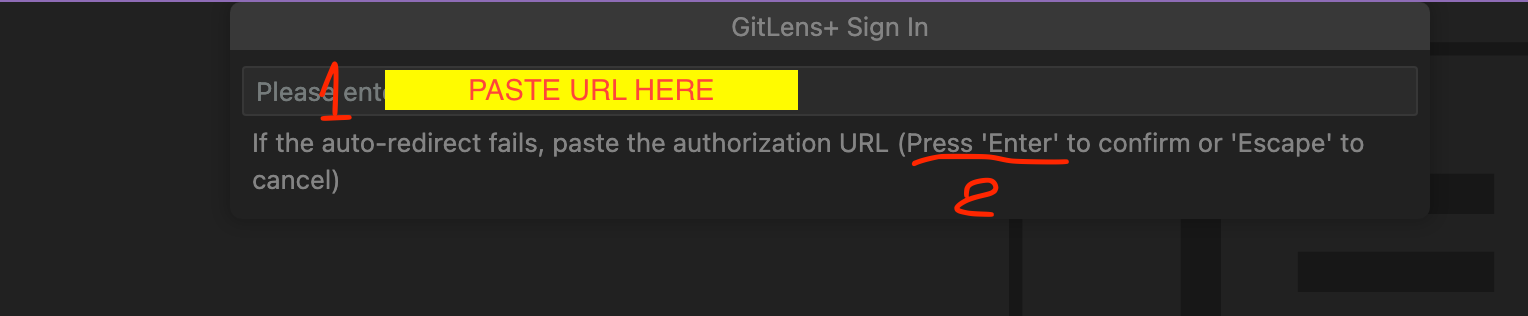
8: Voila:
Nearly six months for this comment that I initially sent through email to arrive. How strange. 😛
Ahhh my bad I was thinking about the builtin git extension.
It looks like GitLens uses
asExternalUrito generate the redirect URI: https://github.com/gitkraken/vscode-gitlens/blob/ec6e207eae89c87152cff89d70f415cc82602527/src/plus/subscription/serverConnection.ts#L113-L120So I bet we need to patch
asExternalUrito include the full path rather than just the host.I think I might have fixed this (I must have forgotten this issue existed). Is is still present in latest code-server?
Thanks, it worked. My bad, didn’t check this, just thought it’s an issue with the code-server. 🤦🏻
It’s ok and thx again.
I’ll let @code-asher chime in and see if he is able to reproduce the issue with the callback
Wow, it works for me! Thx very much. If only callback also works, it’d be perfect.