code-server: code-server 3.2.0 starting but can't access the website
I receive the following response when running code-server on my ubuntu 18.04 VPS:
info  code-server 3.2.0 fd36a99a4c78669970ebc4eb05768293b657716f
info  HTTP server listening on http://127.0.0.1:8080
info    - Password is `somepassword`
info      - To use your own password set the PASSWORD environment variable
info      - To disable use `--auth none`
info    - Not serving HTTPS
info  Automatic updates are enabled
But I can’t access the website. (MY VPS IP + port 8080 which returns This site can’t be reached)
- Web Browser: Chrome
code-server --version: 3.2.0 fd36a99a4c78669970ebc4eb05768293b657716f
About this issue
- Original URL
- State: closed
- Created 6 years ago
- Comments: 17 (7 by maintainers)
Hi ! Sorry for my response being late, l’ve been out of office lately.
Sure I will open an issue with my detailed configs, thanks for your support and reactivity 😃
Oh I see you’ve tried passing
--hostto the service so that can’t be it. Please do open a new issue with your config file and output with--debug. Thanks!@code-asher, thank you for the response. I think I found the problem in checking open/blocked ports on the server.
Simple solution for me is update config.yaml and restart code-server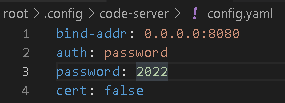 Ofcouse, i sure 8080 port is can access from internet by using a simple http-server
bind-addr: 0.0.0.0:8080Are you hosting it on
0.0.0.0(by using--host 0.0.0.0)? Because127.0.0.1won’t expose the service!