chroma: chromadb fails to install on windows 10 and python 3.9
`Building wheels for collected packages: hnswlib Building wheel for hnswlib (pyproject.toml) … error error: subprocess-exited-with-error
× Building wheel for hnswlib (pyproject.toml) did not run successfully. │ exit code: 1 ╰─> [5 lines of output] running bdist_wheel running build running build_ext building ‘hnswlib’ extension error: Microsoft Visual C++ 14.0 or greater is required. Get it with “Microsoft C++ Build Tools”: https://visualstudio.microsoft.com/visual-cpp-build-tools/ [end of output]
note: This error originates from a subprocess, and is likely not a problem with pip. ERROR: Failed building wheel for hnswlib Failed to build hnswlib ERROR: Could not build wheels for hnswlib, which is required to install pyproject.toml-based projects`
I have also install the latest Microsoft Visual C++ redistributions but it is still giving the error
About this issue
- Original URL
- State: closed
- Created a year ago
- Reactions: 7
- Comments: 23 (1 by maintainers)
You need to download https://visualstudio.microsoft.com/visual-cpp-build-tools/ first.
Next, navigate to “Individual components”, find these two
In your case, you should choose Windows 10 SDK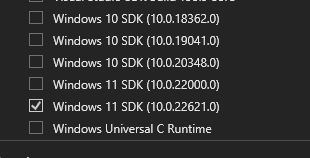
Ok got it… so a long winded solution for my use case but here it goes:
download https://visualstudio.microsoft.com/visual-cpp-build-tools/
however you have to navigate to “Individual components”, find select those that were called out above:
finish the install
reboot computer
Then did a !pip install chromadb==0.3.26 selecting this specific version which worked for me
Solutions I tried but didn’t work for me, however worked for others:
!pip install wheel
!pip install --upgrade setuptools
@HoiDam please be kind. It does sound frustrating.
The above fixes still dont work for me.
This code will be the last of me!!😡
@taqihaider7 install python3.9 dev and install again,
In my case:
this resolved for me
Thanks a lot for this.
It worked perfectly 😃
what to do after installing these files
It worked on my windows machine too!
Yes, this solved my exact same problem. thanks.
this really worked for me. Thanks a lot!!! 😃