chimeraos: Cannot mount second hard drive after ChimeraOS 40 update
After the update, I noticed that my second hard drive would not mount.
I tried a format in the Chimera web interface, and just got this error:
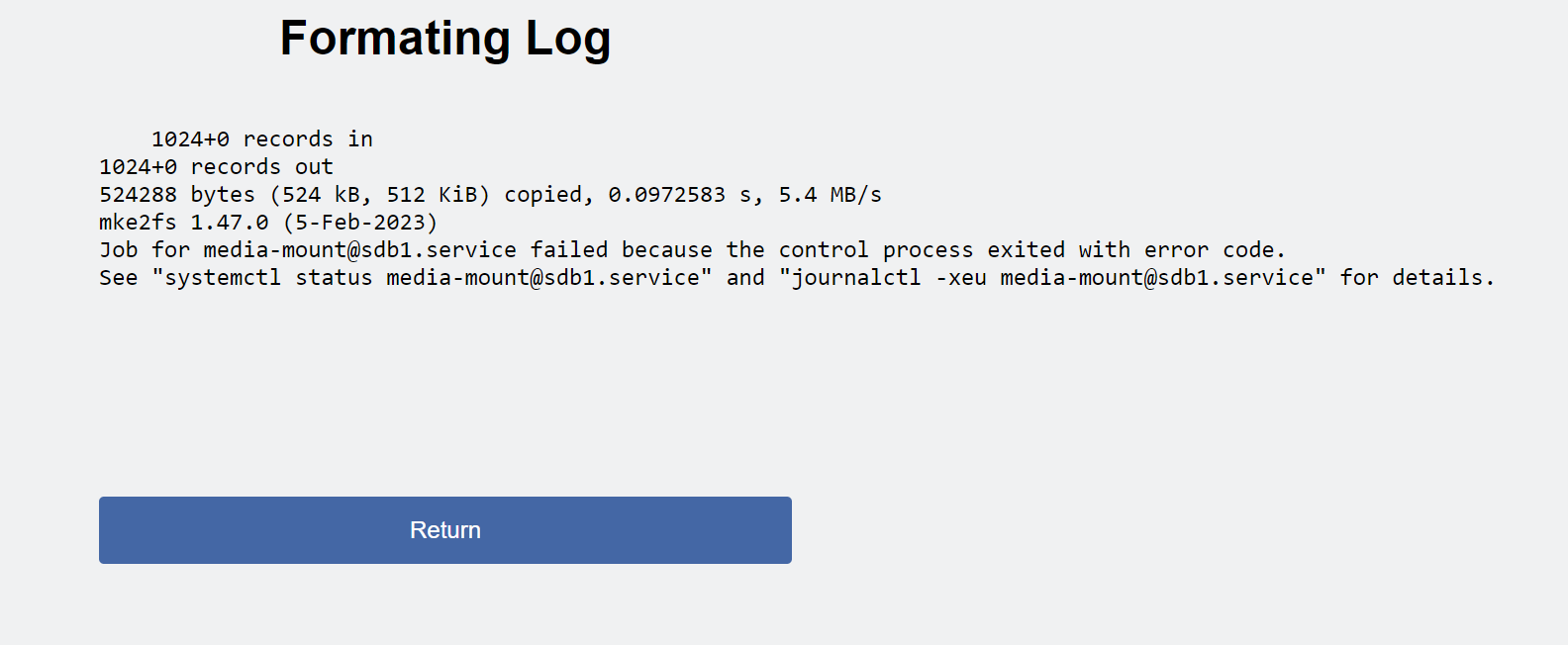
I tried multiple reboots and even drilled down using the commands it gives me and it looks like the drive is failing to mount with this error code:
ConsolePC mount-media.sh[12025]: Error mounting /dev/sdb1: wrong fstype:  - {
ConsolePC mount-media.sh[12025]:       "path": "/dev/sdb1",
ConsolePC mount-media.sh[12025]:       "label": null,
ConsolePC mount-media.sh[12025]:       "fstype": null
ConsolePC mount-media.sh[12025]:  }
ConsolePC systemd[1]: media-mount@sdb1.service: Main process exited, code=exited, status=2/INVALIDARGUMENT
...
ConsolePC mount-media.sh[12047]: Error mounting /dev/sdb1 (status = 1)
ConsolePC systemd[1]: media-mount@sdb1.service: Main process exited, code=exited, status=1/FAILURE
I used sudo to try and run the command that the service was trying to run:
sudo /usr/lib/media-support/mount-media.sh add sdb1
and got the error code:
Call failed: Not authorized to perform operation
Error mounting /dev/sdb1 (status = 1)
I ran the above command as sudo so I’m not sure why it would be unauthorized.
Let me know if you need me to do anything.
About this issue
- Original URL
- State: closed
- Created a year ago
- Comments: 42 (22 by maintainers)
It’s because we started using udisksctl to make the mounted drives match what Gnome expects to eliminate the many potential issues we were seeing users have.
There were two main reasons for the changes.
1.) Users we’re using drives in ways that weren’t initially anticipated. Originally this was intended as a way to add install locations for steam games and no other use case was expected. Things like EmuDeck didn’t exist yet or hadn’t been used in ChimeraOS and we expected folks to use the Chimera app for ROM installs. TV/Movie support is limited as well so that wasn’t really a consideration.
2.) In v39 and previous we were using root to mount and then chown the mounted directory’s contents to the user. Since we were doing it manually it would sometimes conflict with udisks2, and wouldn’t show up in the desktop easily really ever. Additionally, in v39 specifically one of the gnome packages dropped gnome-disks as an explicit dependency and we didn’t notice until it was too late. We had been instructing users to use gnome-disks to access the drives in desktop mode if needed for a couple of versions. This led to an issue where some users weren’t able to manage their ROM’s in the desktop since they couldn’t manually add the drives and it didn’t auto-populate. The steam library would still work, as well as any existing ROM’s, but no new ROM’s could be added unless the CLI was used, and it was complex.
This new method guarantees that users will always have full access to any drives they insert in the desktop as they are now explicitly mounted by the user account using udisks2. We do a couple extra things like add the steam apps folder(steam won’t make this folder automatically if the root of the drive has other folders) as well as adding the SteamLibrary folder and symlink (steam desktop uses SteamLibrary as the top level dir with steam apps inside it, that would mean you’d need to install a game twice on the same drive if you wanted to use it in desktop mode and in “deck” mode)
Now that it’s working it should (hopefully) alleviate any more of these edge cases where people want to use drives for EmuDeck or movies or file transfers, whatever, and we don’t require users to manually re-mount in the desktop anymore to make these changes.
@scamfield I updated the above instructions based on your findings, thanks!
Most of these issues are resolved in the latest version from my comment above so it won’t be necessary to do most of it. The polkit was fixed and we no longer create that link as it was causing issues and not actually solving the problem it was intended to fix. Also, the mount lock was fixed that was causing the mount to start too early during formatting. I think the only thing that isn’t covered is if the link already exists it is causing issues. I’ll look into this to see if there is a way to clean up those links. Thanks.
This should fix it. Please give it a try.
edit: It seems that the mounting will sometimes still fail if the old SteamLibrary link to /run/medai/sda1 is still present. Thanks to @scamfield for figuring this out.
You can solve this issue by doing one the following. Replace sda1 with your drive. I.E. nvme1n1p1, sdb1, or mmcblk0p1. UUID is a long string of letters and numbers that is unique to your drive. It will look be in this format, but be different numbers: 323fb3e1-dd9c-4edd-8700-56619ba2dee0 If the drive is mounted to /run/media/gamer/{UUID} then you can do this:
If your drive is not mounted at all, try:
This is a known issue and we’re working on a hotfix for it. A new version will be released shortly. Thank you for reporting it,