caddy: TLS Handshakes fail when you change the TLD, but use the same subdomain and domain.
Hi, I recently got a new domain, and after setting it up with CloudFlare, Caddy completely broke, and stopped responding to requests. It used to work perfectly, and now it’s timing out. (It’s important to mention, it was working for ~12 hrs on the new domain, but it would intermittently stop responding, and the requests got slower and slower as time went on).
Here’s my caddyfile:
{
	debug
}

vscode.tbuk.me {
	reverse_proxy 127.0.0.1:8080
}
(It’s almost empty because I reinstalled caddy, it’s currently on the latest version, was on 4.1 stable when it was working, and eventually broke). The only service I’m trying to get working again right now is an unmodified install of code-server, to get it working. I’ve used dig and pinged the server to confirm that DNS is resolving, and I can get responses from the expected IP, so it’s all working. I’ve disabled CloudFlare proxying for now until I can get a standard connection working, so that’s not the issue either.
After forwarding port 8080 and connecting directly to the server via it’s public IP, I can connect fine, so that’s not an issue either.
This is all the logs show:
Jan 12 20:42:34 mainserver.tbuk.site caddy[99930]: {"level":"debug","ts":1673577754.0011873,"logger":"admin.api","msg":"received request","method":"GET","host":"localhost:2019","uri":"/metrics","remote_ip":"127.0.0.1","remote_port":"51444","headers":{"Accept":["text/plain;version=0.0.4;q=1,*/*;q=0.1"],"Accept-Encoding":["gzip"],"User-Agent":["netdata/go.d.plugin"]}}
Jan 12 20:42:39 mainserver.tbuk.site caddy[99930]: {"level":"debug","ts":1673577759.0002582,"logger":"admin.api","msg":"received request","method":"GET","host":"localhost:2019","uri":"/metrics","remote_ip":"127.0.0.1","remote_port":"51444","headers":{"Accept":["text/plain;version=0.0.4;q=1,*/*;q=0.1"],"Accept-Encoding":["gzip"],"User-Agent":["netdata/go.d.plugin"]}}
Jan 12 20:42:44 mainserver.tbuk.site caddy[99930]: {"level":"debug","ts":1673577764.0009131,"logger":"admin.api","msg":"received request","method":"GET","host":"localhost:2019","uri":"/metrics","remote_ip":"127.0.0.1","remote_port":"51444","headers":{"Accept":["text/plain;version=0.0.4;q=1,*/*;q=0.1"],"Accept-Encoding":["gzip"],"User-Agent":["netdata/go.d.plugin"]}}
Jan 12 20:42:44 mainserver.tbuk.site caddy[99930]: {"level":"debug","ts":1673577764.5935662,"logger":"events","msg":"event","name":"tls_get_certificate","id":"4b13f313-2e06-4128-84b2-a1f9218c6712","origin":"tls","data":{"client_hello":{"CipherSuites":[4865,4867,4866,49195,49199,52393,52392,49196,49200,49162,49161,49171,49172,156,157,47,53],"ServerName":"vscode.tbuk.me","SupportedCurves":[29,23,24,25,256,257],"SupportedPoints":"AA==","SignatureSchemes":[1027,1283,1539,2052,2053,2054,1025,1281,1537,515,513],"SupportedProtos":["h2","http/1.1"],"SupportedVersions":[772,771],"Conn":{}}}}
Jan 12 20:42:44 mainserver.tbuk.site caddy[99930]: {"level":"debug","ts":1673577764.593671,"logger":"tls.handshake","msg":"choosing certificate","identifier":"vscode.tbuk.me","num_choices":1}
Jan 12 20:42:44 mainserver.tbuk.site caddy[99930]: {"level":"debug","ts":1673577764.5937078,"logger":"tls.handshake","msg":"default certificate selection results","identifier":"vscode.tbuk.me","subjects":["vscode.tbuk.me"],"managed":true,"issuer_key":"acme.zerossl.com-v2-DV90","hash":"94853b476dff18cd2c71aba3f849a83535d038e3de3b2d62e43e92efaae224c0"}
Jan 12 20:42:44 mainserver.tbuk.site caddy[99930]: {"level":"debug","ts":1673577764.59373,"logger":"tls.handshake","msg":"matched certificate in cache","remote_ip":"45.89.173.196","remote_port":"37718","subjects":["vscode.tbuk.me"],"managed":true,"expiration":1681257600,"hash":"94853b476dff18cd2c71aba3f849a83535d038e3de3b2d62e43e92efaae224c0"}
Jan 12 20:42:49 mainserver.tbuk.site caddy[99930]: {"level":"debug","ts":1673577769.0005577,"logger":"admin.api","msg":"received request","method":"GET","host":"localhost:2019","uri":"/metrics","remote_ip":"127.0.0.1","remote_port":"51444","headers":{"Accept":["text/plain;version=0.0.4;q=1,*/*;q=0.1"],"Accept-Encoding":["gzip"],"User-Agent":["netdata/go.d.plugin"]}}
Jan 12 20:42:54 mainserver.tbuk.site caddy[99930]: {"level":"debug","ts":1673577774.0034955,"logger":"admin.api","msg":"received request","method":"GET","host":"localhost:2019","uri":"/metrics","remote_ip":"127.0.0.1","remote_port":"51444","headers":{"Accept":["text/plain;version=0.0.4;q=1,*/*;q=0.1"],"Accept-Encoding":["gzip"],"User-Agent":["netdata/go.d.plugin"]}}
Jan 12 20:42:59 mainserver.tbuk.site caddy[99930]: {"level":"debug","ts":1673577779.0005786,"logger":"admin.api","msg":"received request","method":"GET","host":"localhost:2019","uri":"/metrics","remote_ip":"127.0.0.1","remote_port":"51444","headers":{"Accept":["text/plain;version=0.0.4;q=1,*/*;q=0.1"],"Accept-Encoding":["gzip"],"User-Agent":["netdata/go.d.plugin"]}}
Jan 12 20:43:04 mainserver.tbuk.site caddy[99930]: {"level":"debug","ts":1673577784.0012963,"logger":"admin.api","msg":"received request","method":"GET","host":"localhost:2019","uri":"/metrics","remote_ip":"127.0.0.1","remote_port":"51444","headers":{"Accept":["text/plain;version=0.0.4;q=1,*/*;q=0.1"],"Accept-Encoding":["gzip"],"User-Agent":["netdata/go.d.plugin"]}}
which doesn’t seem to indicate much.
This is my DNS configuration:
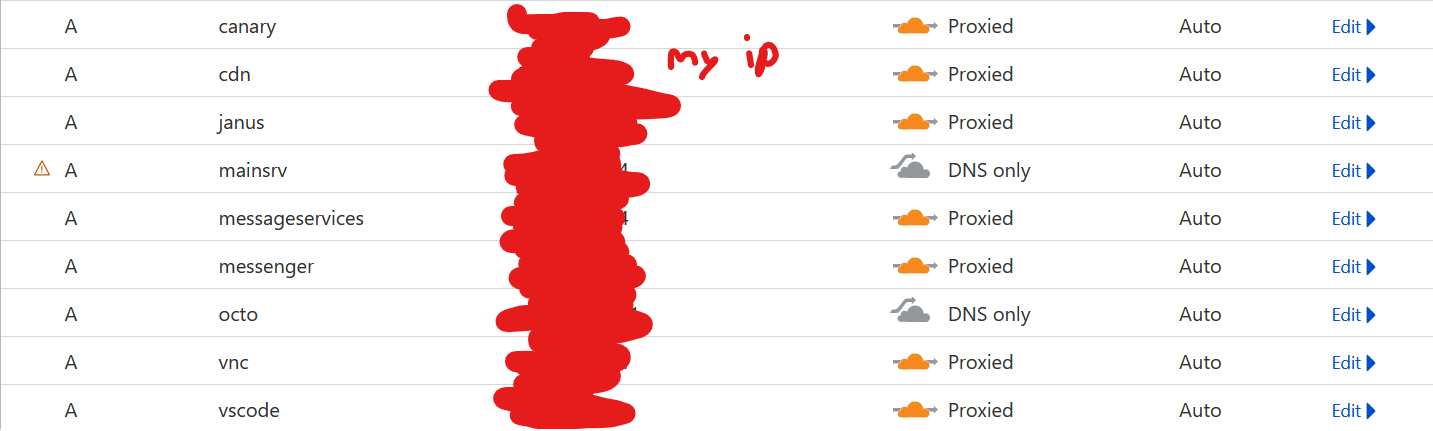
I’ve also made sure the firewall on the server is allowing the traffic, which it is.
Any help with this problem would be greatly appreciated! This happened in the middle of me developing a web app, and I can’t keep working on it until I can access the server again. I’ve been trying to debug this for the past two days, but I’ve completely hit a roadblock, I can’t think of anything else that could be causing this!
About this issue
- Original URL
- State: closed
- Created a year ago
- Comments: 21 (7 by maintainers)
So, I hate to tell you, I can’t reproduce the problem. That site loads instantly just fine for me here. (over TLS)
The good news is, it likely isn’t a Caddy bug. Something about the network in between you and the server…
The logs will say how much was written in an HTTP response. But there’s no way to know how much of it got delivered really. TCP is supposed to do this but network stacks in the middle can make pretty much anything on the wire misleading.
The best way to know if data is actually flowing at the low/raw packet level is a packet capture with Wireshark or similar. Ideally on both client and server.
Alright, it appears to be some weird DNS issue from within the network. I tried using
digto resolve the network itself, and whiletest.tbuk.meresolves fine,vscode.tbuk.medoesn’t.I’ll stop posting updates here now, thanks for all the help everyone!
I FIXED IT! (kinda)
Well, I’m not sure what’s happening at all. I’m pretty sure it is a Caddy bug, but I’m not actually sure what’s causing it or what it is.
I just created another brand-new A record and pointed a basic response to it, and it works flawlessly. The
vscode.tbuk.mesubdomain doesn’t work, however.Okay! Yeah, I’m completely stuck because I changed literally nothing about my network stack except for the domain, so everything should be working. It just never returns a response. If I figure it out, I’ll post an update here.
Also, random side note, I’ve been using Caddy for 2 years now, it’s great software. I’m grateful for all the support behind it, it makes networking a lot simpler and better.
Same thing happens. It just loads until the browser times out.
Edit: here’s some additional information: This is the response from a dig command, showing that it’s resolving fine: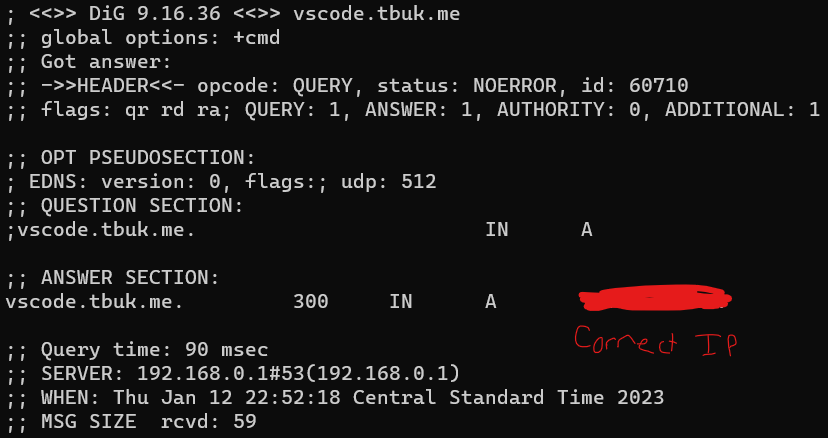
Also, the server OS is Debain 11 Bullseye, if that adds anything.