brave-browser: NTDLL.dll crash, can't choose files, ... dialogs don't work anymore

Description

The system dialogs don’t work anymore, they show up for a split second and then auto close. Leaving in an error in the Event Viewer.

Steps to Reproduce

  1. go to https://www.w3schools.com/howto/howto_html_file_upload_button.asp
  2. click “Choose File”
  3. The file chooser will just hang or crash directly

Actual result:
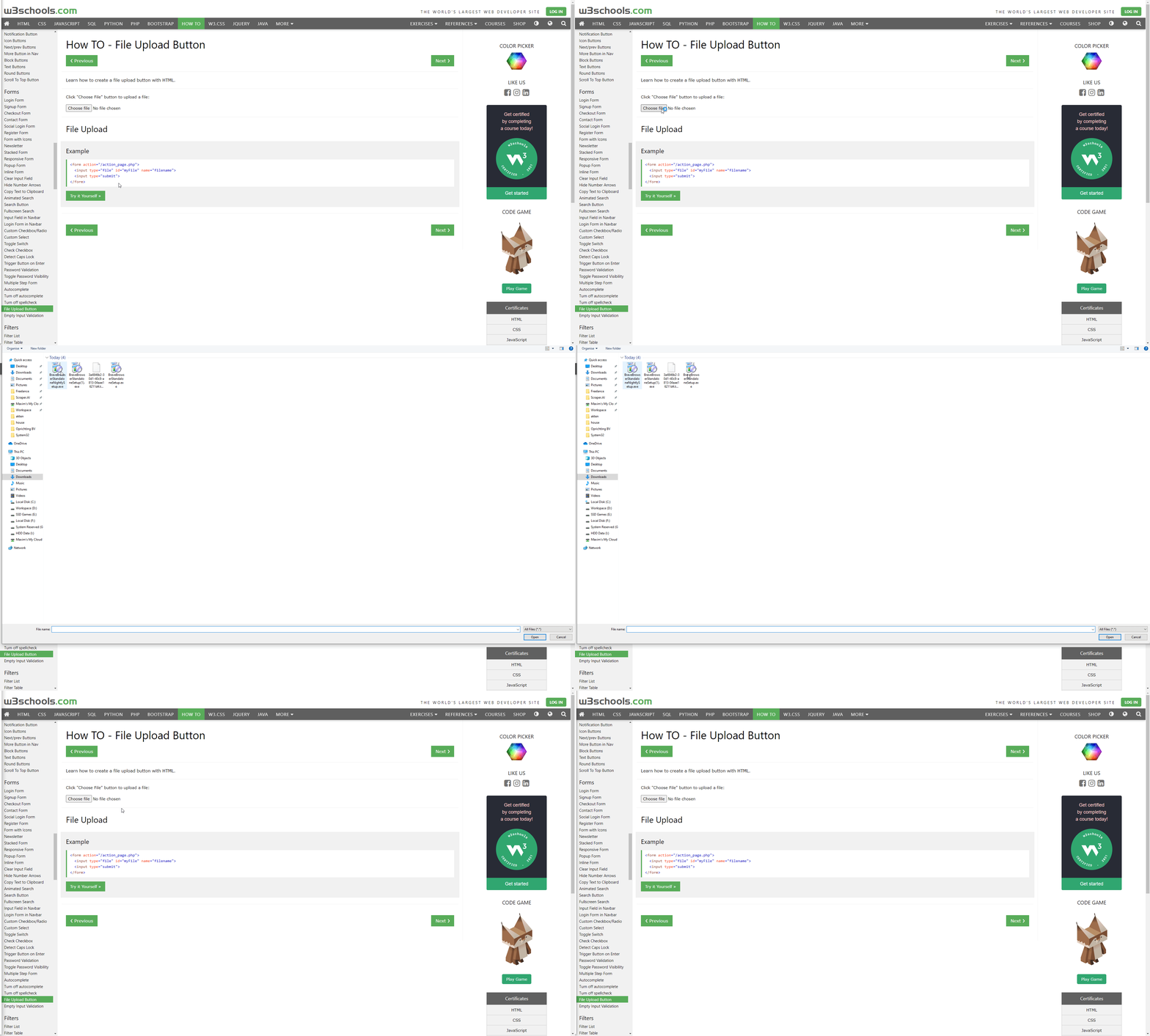
0oT3L39vSs

Expected result:

Doesn’t hang

Reproduces how often:

Every time

Brave version (brave://version info)

1.23.71 Chromium: 90.0.4430.72 (Official Build) (64-bit)

Version/Channel Information:

  • Can you reproduce this issue with the current release? Yes
  • Can you reproduce this issue with the beta channel? Yes
  • Can you reproduce this issue with the nightly channel? Yes

Other Additional Information:

  • Does the issue resolve itself when disabling Brave Shields? No
  • Does the issue resolve itself when disabling Brave Rewards? No
  • Is the issue reproducible on the latest version of Chrome? No

Miscellaneous Information:

Event viewer error:

Faulting application name: brave.exe, version: 90.1.23.71, time stamp: 0x6074c66f
Faulting module name: ntdll.dll, version: 10.0.19041.844, time stamp: 0x60a6ca36
Exception code: 0xc0000409
Fault offset: 0x00000000000a10f1
Faulting process ID: 0x7340
Faulting application start time: 0x01d735bbe678e80e
Faulting application path: C:\Program Files\BraveSoftware\Brave-Browser\Application\brave.exe
Faulting module path: C:\Windows\SYSTEM32\ntdll.dll
Report ID: 79a22ab6-5339-4f20-8395-735b56e7bdda
Faulting package full name: 
Faulting package-relative application ID: 

About this issue

  • Original URL
  • State: closed
  • Created 3 years ago
  • Comments: 28 (13 by maintainers)

Most upvoted comments

@maximgeerinck one more step Chromium team was asking about; do you still experience the problem if you have a fresh profile?

Basically, you can either

  1. rename or move the profile directory out of the way (you’ll see Chrome folder in C:\Users\username\AppData\local\Google; or for testing Brave, Brave-Browser folder in C:\Users\username\AppData\local\BraveSoftware)

OR

  1. Try to run the browser from the command line with --user-data-dir="C:/path-here"

Given I just installed Chrome, it would assume so. However, i just made a new profile, and launched that. tried it again and it also crashes

Thanks for the follow up @maximgeerinck 😄 I shared that information in the Chromium ticket

I did run across this article: https://social.technet.microsoft.com/Forums/ie/en-US/61b44466-6e12-4258-bcb1-af77b2ad701e/ntdlldll-generated-for-application-after-installation-of-kb4343909-windows-10-1803?forum=win10itproapps

There are some steps we can try, if you’re willing 😄 What is being shown here makes sense - and I’m curious if this would solve the issue (even if just a temporary workaround)

  1. Windows key => type Windows Security and hit enter image
  2. On the left of window, pick App & browser control image
  3. Under Exploit protection pick Exploit protection settings image
  4. Click Program settings image
  5. Choose the Add program to customize, then Add by program name and specify chrome.exe
  6. Scroll down to Randomize memory allocations (Bottom-up ASLR), choose to override, and turn OFF image
  7. Try the steps that crash in Chrome again

If that still happens - you might try overriding some of the other program settings. It’s quite possible there’s a bug which is relying on the memory address remaining the same

Whatever change i make, it doesn’t seem to work, it keeps crashing.

Chrome, Brave, they both crash even though i tried many different options in that panel.

Interestingly, Microsoft Edge (Chromium based), does work.

details:

Microsoft Edge | 92.0.902.73 (Official build) (64-bit)
-- | --
Revision | cad199e39220991414cd71868a619fff614880c7
Operating system | Windows 10 OS Version 2009 (Build 19043.1165)
JavaScript | V8 9.2.230.22
User agent | Mozilla/5.0 (Windows NT 10.0; Win64; x64) AppleWebKit/537.36 (KHTML, like Gecko) Chrome/92.0.4515.131 Safari/537.36 Edg/92.0.902.73

Exactly.

This was with all save file dialogs. However, since a recent update, it’s now only for save dialogs resulting from “Save to pdf” (for example when printing)

@maximgeerinck nice - that looks like an officially supported program; I’m trying to find similar reports. Does the crash happen if your window is regular? (ex: it’s not snapped into place using FancyZones)?

Indeed, it also happens when the window was not snapped into place. It also happened in safe mode (where fancy zones is not loaded).

I think it’s a bug in chromium because i also have this with chrome

Brave 1.27.111 Chromium: 92.0.4515.131 (Official Build) (64-bit)
Revision 6b8d6c56ce21e38a72f7c4becb5abc1fa5134f29-refs/branch-heads/4515@{#1933}
OS Windows 10 OS Version 2009 (Build 19043.1110)