brave-browser: Brave freezes or hangs on launch when there are a large number of `Cookies and other site data`
Description
We have several reports from users on all Desktop OSes having a hang or complete freeze of the program when launching. After investigation, this appears to be due to a large number of entries under brave://settings/content/all
Clearing Cookies and other site data will resolve the issue until the user builds up a large number of sites again. @iefremov has characterized the problem (see https://github.com/brave/brave-browser/issues/9481#issuecomment-660111245) and we’re working on a fix
Test plan
- QA to contact @bsclifton for minimal reproducible profile
- Put profile into place
- Launch version of Brave without this fix
- Confirm it takes a while to load
- Launch version of Brave with this fix
- Confirm it loads instantly
Original issue description
Below is the text from when we were diagnosing this issue. There were multiple problems in play and some of those were split out into separate issues. The text is being kept for posterity
GitHub issues
Newly updated Brave freezes after launch - Windows 10 #9372
- started happening with 1.7.98 (Chromium 81)
- multiple users experience freeze for 20 or more seconds, but it’s fine after that
- useful crash dumps shared in issue 🎉 @bsclifton looking into these
- many users had rewards off or toggled rewards off for troubleshooting
Brave Beta hangs on start after update #9162
- user reported issue with 81.1.8.70 (Chromium 81)
- UI unusable to the point where menu can’t be opened
System randomly freezing #9294 - seems to be GPU related - one user reports disabling HW acceleration fixes problem
Possibly related issues
- Crash on MacOS #9233
Community issues
- https://community.brave.com/t/newly-updated-brave-1-7-98-chromium-81-0-4044-113-unresponsive-for-3-min-after-launch/120351
- https://community.brave.com/t/open-new-tab-freezes-brave-window-for-2-secs/122291
Recommended user troubleshooting steps
Things that can help us narrow it down
- If you’re on macOS, check to see if you have the accessibility keyboard enabled under
System Preferences>Accessibility>Keyboard>Accessibility Keyboard. There is a known crash if this is enabled… so until this is fixed, it’s recommended you disable. - Try updating/re-installing your video drivers
- Disable Sync unless you’re using Brave 1.12 or newer
- Ubuntu users who are using the Snap might try using the official repo
Steps that some people have used to fix the problem
We’re working on a fix now - stay tuned.
- Some folks who had toggled rewards and were having hangs every 1 - 3 days where
BAT Ledgerprocess takes 100% CPU and then goes back down may be fixed as of 1.8 🎉 Please make sure to update to latest version of Brave
Following these steps will lead to data loss. Please consider backing up your profile before attempting! If you’re not sure how to do that, please ask here
-
Some folks have had the problem completely resolved by clicking
Restore settings to their original defaultson brave://settings/reset to reset their settings. Workaround discovered by @talisto here -
Some folks who had used sync may have hit a condition where duplicate bookmarks were created. Please see https://github.com/brave/brave-browser/issues/9481#issuecomment-623870404 for more information - kudos to @jonathansampson and a user for narrowing that use-case down 😄 For this case, you can likely try exporting your bookmarks as HTML, clearing your bookmarks in Brave, and then re-importing your bookmarks to see if this helps
Fixes that have already been released
1.8.86(1.8.x) had a fix for the Brave Rewards publishers list. Instead of being requested by only folks with rewards on, it was being requested by anyone who had ever turned on rewards (even if off). This leads to extra CPU usage when processing. Captured with https://github.com/brave/brave-browser/issues/94411.8.86(1.8.x) had an update for top sites on new tab page which regressed performance upon opening a new tab. Behavior introduced in https://github.com/brave/brave-core/pull/5097 was removed and merged into Nightly (1.10) with https://github.com/brave/brave-core/pull/5490
Known problems (not being addressed)
1.7.98(1.7 hotfix 1) introduced migration code for cookie and no-script settings. This is only done once, but it could explain some UI hang that folks experience if they have a lot of cookie or no-script settings. @mkarolin looked into this; having over 300 different content settings could cause a problem- but once it finishes, it won’t happen again. @bsclifton tried with as many as 100 content settings on an old laptop and it wasn’t noticeable. If we wanted to investigate further, we can create an issue and look at https://github.com/brave/brave-core/pull/5453
About this issue
- Original URL
- State: closed
- Created 4 years ago
- Reactions: 5
- Comments: 128 (37 by maintainers)
Commits related to this issue
- NTP: Remove option to bookmark top sites Address https://github.com/brave/brave-browser/issues/9481 — committed to brave/brave-core by cezaraugusto 4 years ago
- NTP: Remove option to bookmark top sites Address https://github.com/brave/brave-browser/issues/9481 — committed to brave/brave-core by cezaraugusto 4 years ago
- NTP: Remove option to bookmark top sites Address https://github.com/brave/brave-browser/issues/9481 — committed to brave/brave-core by cezaraugusto 4 years ago
- don't fire notifications on initialization fix https://github.com/brave/brave-browser/issues/9481 — committed to brave/brave-core by bridiver 4 years ago
- don't fire notifications on initialization fix https://github.com/brave/brave-browser/issues/9481 — committed to brave/brave-core by bridiver 4 years ago
- don't fire notifications on initialization fix https://github.com/brave/brave-browser/issues/9481 — committed to brave/brave-core by bridiver 4 years ago
On MacOS 10.14.6, I updated to the Brave 1.8.84 RC but was still getting the lag on startup. However, I went into Settings > Additional Settings > Reset Settings > “Restore settings to their original defaults”, which seems to have resolved it for me. So it’s definitely profile-related. Using that reset method is much less destructive than torching the whole profile (it keeps bookmarks, history, extension settings, etc), so that’s nice!
Registered with GitHub just to comment on this. Longtime Brave user, suffered from linearly increasing length of time of the hang on startup over the last several months, with “Very High” CPU utilization on one thread.
By the time I got fed up enough with it, it was taking over a minute and a half to start. That consistent increase over time led me to the idea that it was something that I was doing/adding like rewards, bookmarks, settings, add-ons, etc. that was causing this.
For me it was 100% proven in my testing that it was the JavaScript, Cookies, or Fingerprinting individual “site settings” that was the culprit.
Let me explain… I tighten down my browser to seriously uncomfortable levels and then white-list every site that I would like to have Script access, Cookie access, or Tracking/fingerprinting. Since I setup all 23 of my various workstations the same at both home and work with “white-list only” Brave settings, the computers I browse on most have the longest white-list… It is consistent and repeatable for me that as I white list more and more sites it takes longer and longer for Brave to start once it reaches a certain threshold (maybe 100-150 sites?). The workstation with the longest startup times is my home personal computer, with second being my main work computer in my private office at work. All other workstations, laptops, etc. do not suffer NEAR the same startup slowness.
In all cases the slow startup is instantly fixed by Clear browsing data->Time range->All time and Checking only “cookies and other site data.”
That tells me it is either my Script whitelist or Cookie whitelist as I don’t really have too many fingerprinting tracking sites defined.
Yup, kinda expected 😃 No matter how many bookmarks users have, it should not hang up their browser… (as it did not before)
I think several people, including myself, have demonstrated that there’s a profile-related issue in play. I had previously tried switching profiles by creating a new one, quitting Brave, then launching into the new one – no hang.
I just tried your method, renaming the C:\Users\MyUserID\AppData\Local\BraveSoftware\Brave-Browser\User Data directory and then launching Brave into a new profile. Again, no hang. Previously under my default profile I had manually disabled all extensions (others also used --disable-extensions) but still got the (3-min) hang on launch.
Using your rename\UD method, I just tried with two extension (Acrobat & a password manager), and then quickly tried changing a few settings to set up Brave the way I like it (Download folder, home page, DNT enabled, turn off Brave Rewards button, etc.). After quitting & relaunching Brave, I never got a hang.
Whatever’s going on, it doesn’t seem to be a corrupted profile but rather something about a specific profile setting (lack of Brave Rewards, no Crypto Wallet, non-use of Tor, etc.).
Although not crashing it freezes during start up for a few seconds
@bsclifton thank you.
I have no BT keyboard, so I looked around a bit and stumbled upon this.
Looked around and indeed I hadn’t enabled Accessibility Keyboard (as in the linked thread) but Typing feedback was on and turning it off solved it all for me.
I was checking the UX for an accessible app I was developing and completely forgot about it 🤦🏻♂️
Many thanks @ohbobva , we finally were able to nail down the problem, will fix it soon. Some details:
To quickly get a startup performance profile, one can launch the browser with
--trace-startup --trace-startup-file=./trace.json --trace-startup-duration=30and then open the trace usingbrave://tracingSomething strange is defintely happening at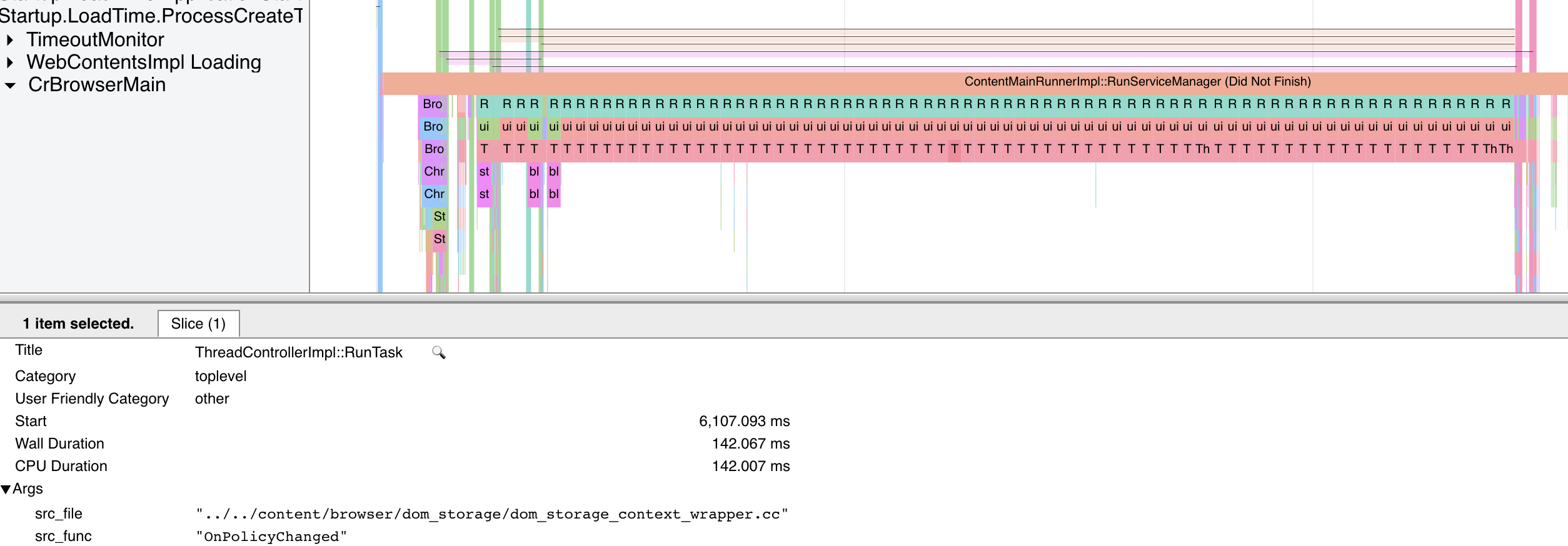
OnPolicyChanged- dozens of calls, ~130ms eachThis is caused by the following chain of events:
BravePrefProvider::UpdateCookieRules->BravePrefProvider::NotifyChanges->PrefProvider::Notify->CookieSettings::OnContentSettingChanged->ExtensionSpecialStoragePolicy::OnCookieSettingChanged->ExtensionSpecialStoragePolicy::NotifyPolicyChangedImpl->SpecialStoragePolicy::NotifyPolicyChanged->DOMStorageContextWrapper::OnPolicyChanged->DOMStorageContextWrapper::OnStoragePolicyChanged.Now
DOMStorageContextWrapper::OnStoragePolicyChangediterates over all origins stored in Local State (~1500 ones) - this takes 140 ms (on a powerful machine) on the UI thread.This notification is triggered as many times as there are rule updates produced by
BravePrefProvider::UpdateCookieRules. In the specific case, there are several dozens of shields down exceptions, each triggers a loop over Local Storage Domains, this is what throws a spanner in the works.cc @bsclifton @bridiver
Thanks @ohbobva - I’m able to reproduce and it definitely does seem tied to the cookies / site data setting. Will continue debugging
Clear browsing data->Time range->All time and Checking only “cookies and other site data.” worked for me.
I have around 1,200 bookmarks but that doesn’t seem to be the issue at all since clearing the cookies+site data does not clear bookmarks. I had already tried removing all of them and it didn’t help so I re-imported them.
I am still having issues with this. I just updated to Version 1.10.97 Chromium: 83.0.4103.116 (Official Build) (64-bit). Anything that I can do to fix this?
I just tested this beta release Version 1.10.60 Chromium: 81.0.4044.138 (Official Build) beta (64-bit)
I have no more hanging issue. I tried to export my bookmarks and then import them, all is fine for me.
Totally agreed @luciash, we’ll get to the bottom of it.
I believe many users experiencing these launch and new-tab hangs may have once participated in Brave Sync (now disabled by default), and as a result had potentially been bitten by an aggressive bookmark-duplication bug. This bug would create numerous copies of your bookmarks, causing things to get out of hand quite quickly.
This issue doesn’t impact all users with Sync enabled (for instance, I had it enabled at the time of writing this, with no issues whatsoever). To see how many bookmarks you have, and whether you may be in the extreme, check out this simple extension (source) in the Chrome Web Store.
Another way to check how many bookmarks you have is to navigate to brave://histograms, and search for
Bookmarks.Count.OnProfileLoad. I have 78 bookmarks in my instance of Brave, so I see the following:This worked for me on Windows 10 with latest brave.
I’m also still experiencing these problems. The problem stops when I switch to a new profile, but I can’t understand how I import all my passwords, cookies etc. from my old profile. Your guide tells me to select “Old Brave” in the drop-down menu but there is no such option.
All I’ve managed to do is transfer bookmarks but nothing else.
I think we’ve done a good job of diagnosing and breaking out specific issues - and there hasn’t been activity in a while.
I’m going to go ahead and close this issue - but please leave comments if you’re experiencing and we can re-open. Moving your profile out of the way is a great step to test if the problem is profile related. If so, you can hit me myself or @jonathansampson to help debug further
Huge thanks to everybody that helped diagnose the problem and confirm fixes along the way 😄
Still happening to me as well
Version 1.8.96 Chromium: 81.0.4044.138 (Official Build) (64-bit)
Opening new tabs is not an issue, only when I’m launching Brave.
This is DEFINITELY true - we’ve identified a few key things and are working on fixes. Thanks everybody for your patience. We don’t have a “smoking gun” per-se, but a lot of great things were identified. This wouldn’t have been possible without all the good troubleshooting steps shared here by you all 😄
Running OS X 10.14.6 (18G4032) on MBP with Brave 1.7.98 Chromium: 81.0.4044.113. Brave has been taking about 20 seconds to become responsive after launch. I tried 1.8.84 & still saw a lag. Hadn’t tried the CL options yet, but just now restored settings to their defaults per the post from @talisto and it worked. What a relief! Amazing how much difference 20 seconds is when we’re used to instant 😃
Just tried v1.8.86 RC3, it still freezes on launch. No problem if using brand new profile, it only freezes when I’m using my old profile.
brave.exe_200429_121845.dmp.zip
This never came up in any of our testing - even now, there are crash reports… but there aren’t many clues. Without a solid way to reproduce, it’s very difficult to find the root cause ☹️
@Xyncgas did the release candidate work for you?
For anyone tracking this who would like to try the 1.8 release candidate, please download and try out https://github.com/brave/brave-browser/releases/tag/v1.8.84 and let us know if this improves behavior 😄
Email sent.
@jonathansampson Sent.
Hi guys, like so many users I have the same issue except when I open a new tab, brave is not hanging. It only happens for 20-30s when I open Brave.
I checked the values Bookmarks.Count.OnProfileLoad and Bookmarks.FileSize
Histogram: Bookmarks.Count.OnProfileLoad recorded 1 samples, mean = 61.0 (flags = 0x61) 0 ... 61 ------------------------------------------------------------------------O (1 = 100.0%) {0.0%} 76 ...Histogram: Bookmarks.FileSize recorded 1 samples, mean = 24.0 (flags = 0x41) 0 ... 21 ------------------------------------------------------------------------O (1 = 100.0%) {0.0%} 33 ...I’m not sure that 61 bookmarks is too much ? Windows 10 64 bits Version 1.8.90 Chromium: 81.0.4044.129 (Official Build) (64-bit) HW acceleration disabled 3 extensions disabled Not using Brave Sync
If you want more informations, i’ll be happy to try to help you to fix it 😃
“Reset Settings” also worked for me. Brave now launches very quickly on my “3-min to unfreeze after launch” system. I did have to re-set a few settings per my prefs, enable some extensions, and log back into a bunch of site. I also upgraded my 2nd system (Brave 1.7.98 => 1.8.86), still seeing a 50-sec hang, so I then did the “Reset Settings” and manual re-sets. That system is now OK also.
I don’t regard the “Reset Settings” as a real “fix” since it doesn’t address the underlying cause that caused Brave to start freezing after a normal upgrade – “Problems that mysteriously go away mysteriously come back…” Hopefully all the info and logs we’ve been providing have given the Brave developers some idea of the root cause.
Brave Version 1.8.86 Chromium: 81.0.4044.129 (Official Build) (64-bit)
I too can confirm that “Reset Settings” indeed fixed the hanging problem. Just reset minutes ago and all is back to normal. TY Tech’s ^5
Yup, can confirm that “Reset settings” fixed the problem. And as @talisto mentioned, you still keep things like bookmarks, history, extension settings, etc. Thanks for sharing.
“Reset Settings” indeed fix the hanging problem, no more high CPU usage while launching the browser ! All I can tell the difference between before/after reset the settings is that the cookies are gone, and the browser extensions are all disabled ( re-enabling those extensions did not hang the browser, everything seems to be fine ). The other settings seems to remain unchanged.
So the problem might have something to do with the cookies ? I’ve been using Brave for quite a while ( almost 2 years I guess ) and haven’t clear those cookies since the beginning. Maybe it has something to do with those large amount of cookies 🍪
@bsclifton It’s Application Support, not Application Settings, but yes this fixes the hanging, so it does appear to be profile-related.
I’ve never had Brave crash, just hang for a while on launch **.
On my home system (high end mobo & CPU, very good graphics card, 32G DDR4, DisplayPort monitor, etc.) with v1.8.86 RC3 or 1.7.98, the hang lasts for about 3-min while using 10% of my CPU.
On my work laptop (older slower model, 16G DDRx, not fancy graphics but using DP) running 1.7.98, the hang lasts about 50-sec while using > 40% of the CPU. So speed (CPU & GPU) doesn’t seem to be the deciding factor.
** a couple of times during the hang I’ve managed to drop the hamburger and launch the Brave Task Manager by “feel” – all I see is menu outlines for the burger menu then More Tools menu, so I kind of guessed where I needed to hover to launch the TM. I got lucky a couple times, but the TM was just a white window that didn’t show me anything. When Brave started responding and filled in the TM window, I briefly saw “Browser” sucking a high amount before falling to just a few % (normal). So it didn’t look like it was the GPU Process or an extension.
Hey guys, would like to post about my case, hope it’ll help identifying the issue.
ENV
Detail
I installed the brave browser with “BraveBrowserStandaloneSetup.exe” ( v1.8.86 )
Then I launched the browser with
Here’s the ouput:
The browser didn’t crash though, however for the first few seconds it hangs and the task manager shows that the CPU usage was pretty high. After about 15 seconds everything went back to normal, the browser start working again.
Hope this help !
Copied Brave-Browser folder => Brave-Browser-Nightly Installed and running Purple-Brave. Still see my 3-min freeze on launch.
[C:\Program Files (x86)\BraveSoftware\Brave-Browser-Nightly\Application]brave.exe --args --log-level=2 --enable-logging=stderr
[C:\Program Files (x86)\BraveSoftware\Brave-Browser-Nightly\Application][6704:29500:0429/075142.916:ERROR:browser_switcher_service.cc(238)] XXX Init() [10780:15004:0429/075142.933:INFO:confirmations_impl.cc(57)] Initializing confirmations [10780:15004:0429/075142.933:INFO:confirmations_impl.cc(760)] Loading confirmations state [10780:15004:0429/075144.337:INFO:confirmations_impl.cc(779)] Successfully loaded confirmations state [10780:15004:0429/075144.337:INFO:confirmations_impl.cc(740)] Saving confirmations state [10780:15004:0429/075144.338:INFO:confirmations_impl.cc(740)] Saving confirmations state [10780:15004:0429/075144.338:INFO:confirmations_impl.cc(740)] Saving confirmations state [10780:15004:0429/075144.366:INFO:confirmations_impl.cc(756)] Successfully saved confirmations state [10780:15004:0429/075144.374:INFO:confirmations_impl.cc(756)] Successfully saved confirmations state [10780:15004:0429/075144.381:INFO:confirmations_impl.cc(756)] Successfully saved confirmations state [6704:5400:0429/075144.389:ERROR:rewards_service_impl.cc(187)] Failed to read file: C:\Users\andrew\AppData\Local\BraveSoftware\Brave-Browser-Nightly\User Data\Default\ledger_state [10780:15004:0429/075144.400:ERROR:ledger_impl.cc(113)] Failed to initialize wallet TCC: (Sys) Access is denied. “\.\pipe\chrome.nativeMessaging.out.6d0b69e0a095fc54” [6704:29500:0429/075600.370:ERROR:CONSOLE(4)] “Polymer is already defined.”, source: chrome://settings/crisper.js (4)
Note: TCC = Take Command Console window. Program launches from that console window via CLI, but doesn’t launch from a normal Windows CMD or Windows PowerShell window (normal or admin).
Version 1.10.19 Chromium: 81.0.4044.129 (Official Build) nightly (64-bit)
@tmancey Thanks, but I prefer to do it through here or the community forum. I’m currently doing something else, don’t want to have to be on screen the entire time.
Should probably check with @GitOutWest if it’s okay for him/her.
@bsclifton The Nightly still has the same issue.
Yes, I’m also getting confirmation states. I can email you the full logs if you need it. Not sure if it’s safe sharing it here because I saw there’s payment id there.
That’s what it did look like. I was just trying to save space, but I guess that backfired…
And no, I don’t have Rewards enabled.
I tried each of those one at time, with my 3-min freeze of Brave each time on launch. As I noted, I saw the missing extensions (e.g. no icons in Brave) in the case of the “–disable-extensions” option. So I’ll assume that the other two did their thing also.
“C:\Program Files (x86)\BraveSoftware\Brave-Browser\Application\brave.exe” --disable-brave-sync
“C:\Program Files (x86)\BraveSoftware\Brave-Browser\Application\brave.exe” --disable-extensions
“C:\Program Files (x86)\BraveSoftware\Brave-Browser\Application\brave.exe” --disable-gpu
You should download BraveBrowserStandaloneSetup.exe, that’s the right one.
@intelligentpotato what OS are you on?
As a troubleshooting step, for the more tech savvy folks - you can help us determine if the hanging is a profile-specific problem:
Brave-Browser/Brave-Browser-Beta/Brave-Browser-Dev/Brave-Browser-Nightly, depending on your release channel.~/Library/Application Support/BraveSoftware/<RELEASE_CHANNEL>out of the way. You can rename to just add.oldat the end%userprofile%\AppData\Local\BraveSoftware\<RELEASE_CHANNEL>\User Data~/.config/BraveSoftware/<RELEASE_CHANNEL>~/snap/66/BraveSoftware/<RELEASE_CHANNEL>Quit all instances of Brave and then rename the folder. You can relaunch and you’ll have a brand new profile. I’m curious if the problem still happens then (try visiting a few websites). If not, we know the bug is related to something about the user profile
After testing, you can go back to the folder you renamed, remove the new one which got created, and rename the folder back to the old name.
If you’re not sure what I’m talking about in this post, please don’t attempt the above steps 😄
From #9162
I have to force kill it, else it just hangs.
Just checked out the RC2, the issue is still there.
I’ll also mention that [Google] Chrome doesn’t have this problem. So I don’t think it’s Chromium 81.x all by itself. Chrome: 81.0.4044.113 (Official Build) (64-bit), and now 81.0.4044.122 (Official Build) (64-bit).
@riccardoangius this is great! Thanks for finding 😄 I believe we captured the above issue (accessibility keyboard) with https://github.com/brave/brave-browser/issues/7546 but haven’t solved it yet
macOS users please do try turning this off, if that is an option for you. For those who need it, a fix should be coming in Chromium 83 which we’re working through now (Chromium 82 was skipped by Chrome team). Expected to be released May 19th
Same here on Windows 10, it still freezes.
brave.exe_200427_193816.zip
Thank you. Clean install is still crashing on my side though.
EDIT: also tried the suggested flags, to no avail.