braintree_android: SecurityException when calling performVerification on a ThreeDSecureClient
General information
- SDK/Library version: 4.7.0
- Environment: Production and Sandbox
- Android Version and Device: Android 12, Pixel 5
- Braintree dependencies:
- com.braintreepayments.api:three-d-secure:4.7.0
- com.braintreepayments:card-form:4.3.0
Issue description
There is a very weird crash happening in my app since upgrading to Android 12, and it seems to be crashing somewhere inside the Braintree SDK, every time I call ThreeDSecureClient.performVerification(activity, request, callback)
java.lang.SecurityException: Need android.permission.BLUETOOTH_CONNECT permission for android.content.AttributionSource@fed5b655: getAddress at android.os.Parcel.createExceptionOrNull(Parcel.java:2425) at android.os.Parcel.createException(Parcel.java:2409) at android.os.Parcel.readException(Parcel.java:2392) at android.os.Parcel.readException(Parcel.java:2334) at android.bluetooth.IBluetoothManager$Stub$Proxy.getAddress(IBluetoothManager.java:773) at android.bluetooth.BluetoothAdapter.getAddress(BluetoothAdapter.java:1279) at com.cardinalcommerce.shared.cs.f.b.<init>(Unknown Source:23) at com.cardinalcommerce.shared.cs.f.g.b(Unknown Source:69) at com.cardinalcommerce.shared.cs.f.g.a(Unknown Source:7) at com.cardinalcommerce.shared.cs.a.b.a(Unknown Source:2) at com.cardinalcommerce.cardinalmobilesdk.a.a.a.a(Unknown Source:132) at com.cardinalcommerce.cardinalmobilesdk.Cardinal.configure(Unknown Source:24) at com.braintreepayments.api.CardinalClient.configurationCardinal(CardinalClient.java:62) at com.braintreepayments.api.CardinalClient.initialize(CardinalClient.java:21) at com.braintreepayments.api.ThreeDSecureClient$1.onResult(ThreeDSecureClient.java:104) at com.braintreepayments.api.ConfigurationLoader$1.onResult(ConfigurationLoader.java:52) at com.braintreepayments.api.HttpClient$2.run(HttpClient.java:123) at android.os.Handler.handleCallback(Handler.java:938) at android.os.Handler.dispatchMessage(Handler.java:99) at android.os.Looper.loopOnce(Looper.java:201) at android.os.Looper.loop(Looper.java:288) at android.app.ActivityThread.main(ActivityThread.java:7842) at java.lang.reflect.Method.invoke(Native Method) at com.android.internal.os.RuntimeInit$MethodAndArgsCaller.run(RuntimeInit.java:548) at com.android.internal.os.ZygoteInit.main(ZygoteInit.java:1003) Caused by: android.os.RemoteException: Remote stack trace: at com.android.server.BluetoothManagerService.checkPermissionForDataDelivery(BluetoothManagerService.java:2918) at com.android.server.BluetoothManagerService.checkConnectPermissionForDataDelivery(BluetoothManagerService.java:2936) at com.android.server.BluetoothManagerService.getAddress(BluetoothManagerService.java:1703) at android.bluetooth.IBluetoothManager$Stub.onTransact(IBluetoothManager.java:365) at android.os.Binder.execTransactInternal(Binder.java:1179)
I am very confused by this as I don’t understand why this would have anything to do with Braintree SDK? Why would this library want to have a Bluetooth permission?
Other info that might help:
- This started happening on Android 12
- I did not yet confirm if it happens on all or only some Android 12 devices
- My app indeed does use Bluetooth and I do have all required Bluetooth permissions inside the manifest, including BLUETOOTH_CONNECT related to this crash
- There is no other Bluetooth related code being called at the time when this happens. 3DS performVerification is the only process really happening in the app
- If I wrap the
performVerificationblock of code inside try catch, it still crashes and Exception is not caught
About this issue
- Original URL
- State: closed
- Created 3 years ago
- Reactions: 2
- Comments: 26 (12 by maintainers)
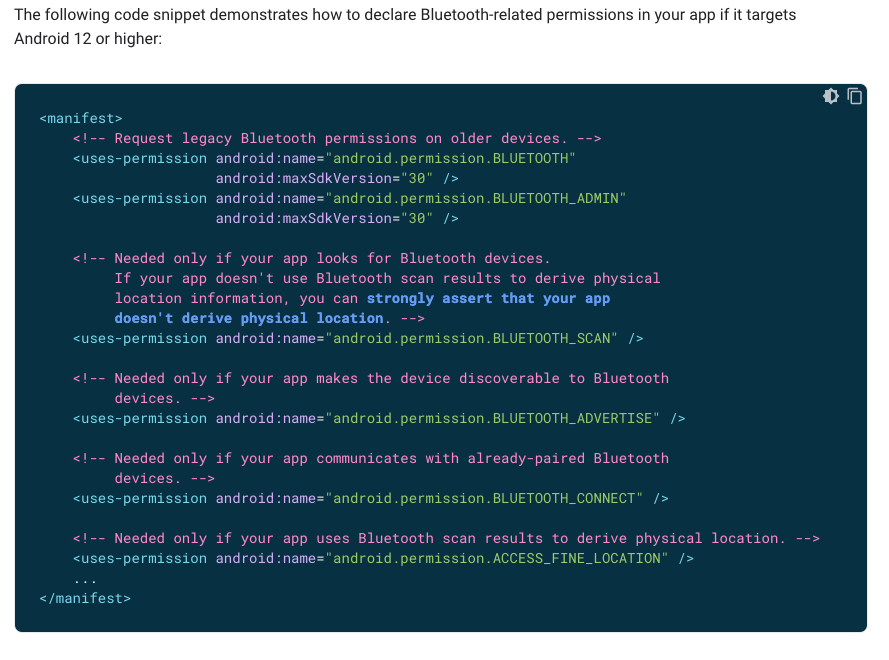
Hi @solrace. Thanks for the reply, the documentation screenshot you shared actually helped me get to the solution!
These were my permissions before (crash):
The crash disappears after changing it to:
So for anyone running into the same issue, the trick is to add the
maxSdkVersionwhere necessary. AddingBLUETOOTH_CONNECTalone is not the solution.Hi everyone - We’ve received an update from Cardinal that they have a fix for this that is targeted to be included in their
2.2.6-2release. We do not have an exact date for that release, but will post an update here when we have the fix!@bm185178 - Drop-in
6.1.0has been released and supports4.10.0@josephyanks - We have relayed this to Cardinal and will post and update here when we have more information
Hi all - Cardinal has provided us with a release that includes a fix for this issue, and we have released a new version of the SDK including this upgrade. Please update to version
4.10.0. Please re-open this ticket if you are still experiencing this issue after updating.@bm185178 it’s actually an issue with a 3rd-party dependency we use for fraud detection. We’ve notified our MPI of the issue. We’ll post here when we receive an update.
Hello Matej: Would you be able to confirm the use of the “manifest” and entries? Here is the “code snippet” that demonstrates how to declare Bluetooth related permissions you app to target Android 12 and higher.