psysh: cannot use any psysh command
I have installed psysh on my system using the command composer global require psy/psysh:@stable and, odd enough, I cannot use any of its command. Image below shows what’s happening:
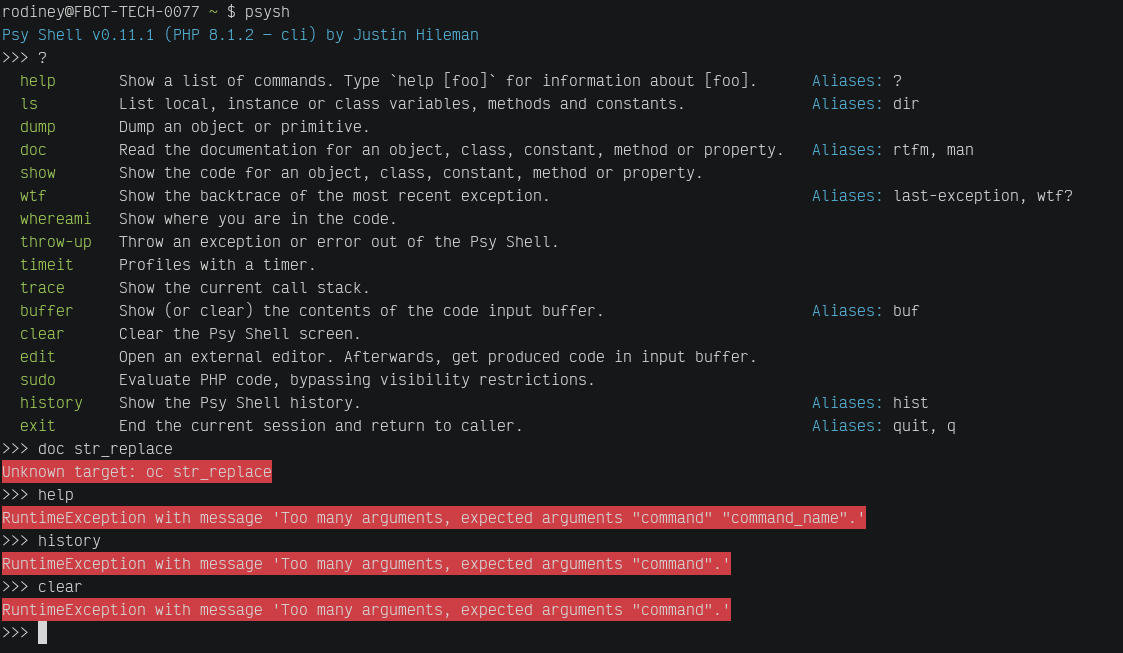
Here is the output of lsb_release -a:
No LSB modules are available.
Distributor ID: Ubuntu
Description:    Ubuntu 20.04.2 LTS
Release:        20.04
Codename:       focal
Any ideas?
About this issue
- Original URL
- State: closed
- Created 2 years ago
- Comments: 16 (13 by maintainers)
Annnnnd we’re fixed. Thanks for your patience!
I’m keeping this issue open and pinned until the next symfony/console release to help everyone else out 😃
As of todays Symfony release(s), we’ve got green builds again 😃
https://github.com/bobthecow/psysh/runs/5360469314
Yes that is correct. I don’t think you can do much here except pin an issue with a clear workaround explainer in the top post, then wait it out.
In such cases I usually edit the OP with a big fat heading like:
Elsewhere, @reedy recommended making a new PsySH release with a conflict clause in
composer.json:This is the same as #703 and #704, and is caused by a backwards compatibility break in the latest version(s) of symfony/console. The fix has been merged, and should be in the next release. Until then, you can work around it by pinning to
symfony/console:6.0.2: