backstage: Azure auth provider doesn't work with latest version

Expected Behavior

I’m able to sign in using the Azure provider.

Actual Behavior

I’m getting the following error: The Microsoft Active Directory provider is not configured to support sign-in
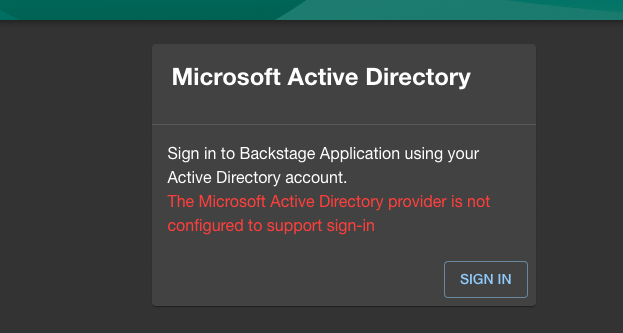
image

Steps to Reproduce

  1. npm i @backstage/create-app@0.4.26
  2. npx backstage-create-app
  3. Replace generated App.tsx with the following https://gist.github.com/nadworny/cbe79d3a5a1e645efbd38c051edea621

Context

These are the lines that I changed/added in the App.tsx:

import { AlertDisplay, OAuthRequestDialog, SignInProviderConfig, SignInPage } from '@backstage/core-components';
import { microsoftAuthApiRef } from '@backstage/core-plugin-api';

const microsoftAuthProvider: SignInProviderConfig = {
  id: 'azure-auth-provider',
  title: 'Microsoft Active Directory',
  message: 'Sign in to Backstage Application using your Active Directory account.',
  apiRef: microsoftAuthApiRef,
};

const app = createApp({
  apis,
  components: {
    SignInPage: props => (
      <SignInPage
        {...props}
        auto
        provider={microsoftAuthProvider}
      />
    ),
  },
...

The exact same changes worked with the @backstage/create-app@0.3.45.

Also, the documentation doesn’t seem to be up to date as there is a dead link under https://backstage.io/docs/auth/microsoft/provider. The Adding the provider to the sign-in page at the very end doesn’t exist:

Adding the provider to the Backstage frontend
To add the provider to the frontend, add the microsoftAuthApiRef reference and SignInPage component as shown in [Adding the provider to the sign-in page](https://backstage.io/docs/auth/#adding-the-provider-to-the-sign-in-page).

Your Environment

  • Browser Information: Edge Version 101.0.1210.32 (Official build) (arm64)

  • Output of yarn backstage-cli info:

yarn run v1.22.17
OS:   Darwin 21.4.0 - darwin/x64
node: v14.18.3
yarn: 1.22.17
cli:  0.17.0 (installed)

Dependencies:
  @backstage/app-defaults                    1.0.1
  @backstage/backend-common                  0.13.2
  @backstage/backend-tasks                   0.3.0
  @backstage/catalog-client                  1.0.1
  @backstage/catalog-model                   1.0.1
  @backstage/cli-common                      0.1.8
  @backstage/cli                             0.17.0
  @backstage/config-loader                   1.1.0
  @backstage/config                          1.0.0
  @backstage/core-app-api                    1.0.1
  @backstage/core-components                 0.9.3
  @backstage/core-plugin-api                 1.0.1
  @backstage/errors                          1.0.0
  @backstage/integration-react               1.0.1
  @backstage/integration                     1.1.0
  @backstage/plugin-api-docs                 0.8.4
  @backstage/plugin-app-backend              0.3.31
  @backstage/plugin-auth-backend             0.13.0
  @backstage/plugin-auth-node                0.2.0
  @backstage/plugin-catalog-backend          1.1.1
  @backstage/plugin-catalog-common           1.0.1
  @backstage/plugin-catalog-graph            0.2.16
  @backstage/plugin-catalog-import           0.8.7
  @backstage/plugin-catalog-react            1.0.1
  @backstage/plugin-catalog                  1.1.0
  @backstage/plugin-github-actions           0.5.4
  @backstage/plugin-org                      0.5.4
  @backstage/plugin-permission-common        0.6.0
  @backstage/plugin-permission-node          0.6.0
  @backstage/plugin-permission-react         0.4.0
  @backstage/plugin-proxy-backend            0.2.25
  @backstage/plugin-scaffolder-backend       1.1.0
  @backstage/plugin-scaffolder-common        1.0.1
  @backstage/plugin-scaffolder               1.1.0
  @backstage/plugin-search-backend-module-pg 0.3.2
  @backstage/plugin-search-backend-node      0.6.0
  @backstage/plugin-search-backend           0.5.1
  @backstage/plugin-search-common            0.3.3
  @backstage/plugin-search-react             0.1.0
  @backstage/plugin-search                   0.8.0
  @backstage/plugin-tech-radar               0.5.11
  @backstage/plugin-techdocs-backend         1.1.0
  @backstage/plugin-techdocs-node            1.1.0
  @backstage/plugin-techdocs-react           0.1.0
  @backstage/plugin-techdocs                 1.1.0
  @backstage/plugin-user-settings            0.4.3
  @backstage/release-manifests               0.0.2
  @backstage/search-common                   0.3.3
  @backstage/test-utils                      1.0.1
  @backstage/theme                           0.2.15
  @backstage/types                           1.0.0
  @backstage/version-bridge                  1.0.1

About this issue

  • Original URL
  • State: closed
  • Created 2 years ago
  • Reactions: 6
  • Comments: 24 (12 by maintainers)

Most upvoted comments

auth.js

import {
  createRouter,
  providers,
  defaultAuthProviderFactories,
} from '@backstage/plugin-auth-backend';
import { DEFAULT_NAMESPACE, stringifyEntityRef, } from '@backstage/catalog-model';
import { Router } from 'express';
import { PluginEnvironment } from '../types';

export default async function createPlugin(
  env: PluginEnvironment,
): Promise<Router> {
  return await createRouter({
    logger: env.logger,
    config: env.config,
    database: env.database,
    discovery: env.discovery,
    tokenManager: env.tokenManager,
    providerFactories: {
      ...defaultAuthProviderFactories,
      microsoft: providers.microsoft.create({
        signIn: {
          resolver: async ({ profile }, ctx) => {
              if (!profile.email) {
                throw new Error(
                  'Login failed, user profile does not contain an email',
                );
              }
              // We again use the local part of the email as the user name.
              const [localPart] = profile.email.split('@');

              // By using `stringifyEntityRef` we ensure that the reference is formatted correctly
              const userEntityRef = stringifyEntityRef({
                kind: 'User',
                name: localPart,
                namespace: DEFAULT_NAMESPACE,
              });

              return ctx.issueToken({
                claims: {
                  sub: userEntityRef,
                  ent: [userEntityRef],
                },
              });
            },
        },
      }),
      },
    });
}

App.tsx

import React from 'react';
import { Navigate, Route } from 'react-router';
import { apiDocsPlugin, ApiExplorerPage } from '@backstage/plugin-api-docs';
import {
  CatalogEntityPage,
  CatalogIndexPage,
  catalogPlugin,
} from '@backstage/plugin-catalog';
import {
  CatalogImportPage,
  catalogImportPlugin,
} from '@backstage/plugin-catalog-import';
import { ScaffolderPage, scaffolderPlugin } from '@backstage/plugin-scaffolder';
import { orgPlugin } from '@backstage/plugin-org';
import { SearchPage } from '@backstage/plugin-search';
import { TechRadarPage } from '@backstage/plugin-tech-radar';
import {
  TechDocsIndexPage,
  techdocsPlugin,
  TechDocsReaderPage,
} from '@backstage/plugin-techdocs';
import { UserSettingsPage } from '@backstage/plugin-user-settings';
import { apis } from './apis';
import { entityPage } from './components/catalog/EntityPage';
import { searchPage } from './components/search/SearchPage';
import { Root } from './components/Root';

import { AlertDisplay, OAuthRequestDialog, SignInProviderConfig, SignInPage } from '@backstage/core-components';
import { createApp } from '@backstage/app-defaults';
import { FlatRoutes } from '@backstage/core-app-api';
import { CatalogGraphPage } from '@backstage/plugin-catalog-graph';
import { PermissionedRoute } from '@backstage/plugin-permission-react';
import { catalogEntityCreatePermission } from '@backstage/plugin-catalog-common/alpha';
import { microsoftAuthApiRef } from '@backstage/core-plugin-api';

const microsoftAuthProvider: SignInProviderConfig = {
  id: 'azure-auth-provider',
  title: 'Microsoft Active Directory',
  message: 'Sign in to Backstage Application using your Active Directory account.',
  apiRef: microsoftAuthApiRef,
};

const app = createApp({
  apis,
  components: {
    SignInPage: props => (
      <SignInPage
        {...props}
        auto
        provider={microsoftAuthProvider}
      />
    ),
  },
  bindRoutes({ bind }) {
    bind(catalogPlugin.externalRoutes, {
      createComponent: scaffolderPlugin.routes.root,
      viewTechDoc: techdocsPlugin.routes.docRoot,
    });
    bind(apiDocsPlugin.externalRoutes, {
      registerApi: catalogImportPlugin.routes.importPage,
    });
    bind(scaffolderPlugin.externalRoutes, {
      registerComponent: catalogImportPlugin.routes.importPage,
    });
    bind(orgPlugin.externalRoutes, {
      catalogIndex: catalogPlugin.routes.catalogIndex,
    });
  },
});

const AppProvider = app.getProvider();
const AppRouter = app.getRouter();

const routes = (
  <FlatRoutes>
    <Navigate key="/" to="catalog" />
    <Route path="/catalog" element={<CatalogIndexPage />} />
    <Route
      path="/catalog/:namespace/:kind/:name"
      element={<CatalogEntityPage />}
    >
      {entityPage}
    </Route>
    <Route path="/docs" element={<TechDocsIndexPage />} />
    <Route
      path="/docs/:namespace/:kind/:name/*"
      element={<TechDocsReaderPage />}
    />
    <Route path="/create" element={<ScaffolderPage />} />
    <Route path="/api-docs" element={<ApiExplorerPage />} />
    <Route
      path="/tech-radar"
      element={<TechRadarPage width={1500} height={800} />}
    />
    <PermissionedRoute
      path="/catalog-import"
      permission={catalogEntityCreatePermission}
      element={<CatalogImportPage />}
    />
    <Route path="/search" element={<SearchPage />}>
      {searchPage}
    </Route>
    <Route path="/settings" element={<UserSettingsPage />} />
    <Route path="/catalog-graph" element={<CatalogGraphPage />} />
  </FlatRoutes>
);

const App = () => (
  <AppProvider>
    <AlertDisplay />
    <OAuthRequestDialog />
    <AppRouter>
      <Root>{routes}</Root>
    </AppRouter>
  </AppProvider>
);

export default App;

Great! Thank you for share with us, it works for me. One question, where did you find support (documentation, forums…) to know how to setup the auth.js for Microsoft Azure AD? I didn’t find any support searching in backstage site or outside backstage.

Regards

For sure @nadworny, my intention was more for the others looking at this issue

thanks @awanlin , I’m aware of it. We have postponed azure ad sync for a later date.