service-workbench-on-aws: [Bug] Sagemaker autostop script not pulling from s3 bucket
Describe the bug
We encountered an interesting issue regarding the auto stop script. We had no code changes, but suddenly, Sagemaker instances started hanging around for days, with no use. Looking into the instance, the cron job was failing, because the autostop.py script had a syntax error. When I look at the script, it has this line print(f'Notebook idle state set as {idle} because no kernel has been detected.') which caused the syntax error. However, the file on the repo, as well as the s3 bucket, does not contain this line. So, after some digging, I found that this line was introduced here, in this commit aws-samples/amazon-sagemaker-notebook-instance-lifecycle-config-samples/. What I don’t understand is how it got into the Sagemaker notebook, and why it’s not being overridden by the custom config start we have here sagemaker-notebook-instance.cfn.yml This script and repo was updated in the last 16 hours to remove this syntax error.
To Reproduce
Launch a Sagemaker instance. You can tell which version of the script it’s using by looking at the autostop script, less /usr/local/bin/autostop.py and find lines 96-101.
The AWS version of the script on the awslabs/service-workbench-on-aws repo has these lines, reference
if notebook['kernel']['connections'] == 0:
    if not is_idle(notebook['kernel']['last_activity']):
        idle = False
else:
    idle = False
And on the aws-samples/amazon-sagemaker-notebook-instance-lifecycle-config-samples repo, reference
if notebook['kernel']['connections'] == 0:
    if not is_idle(notebook['kernel']['last_activity']):
        idle = False
else:
    idle = False
    print('Notebook idle state set as %s because no kernel has been detected.' % idle)
Expected behavior The autostop script in the s3 bucket should be the one used for SWB Sagemaker instances.
Screenshots
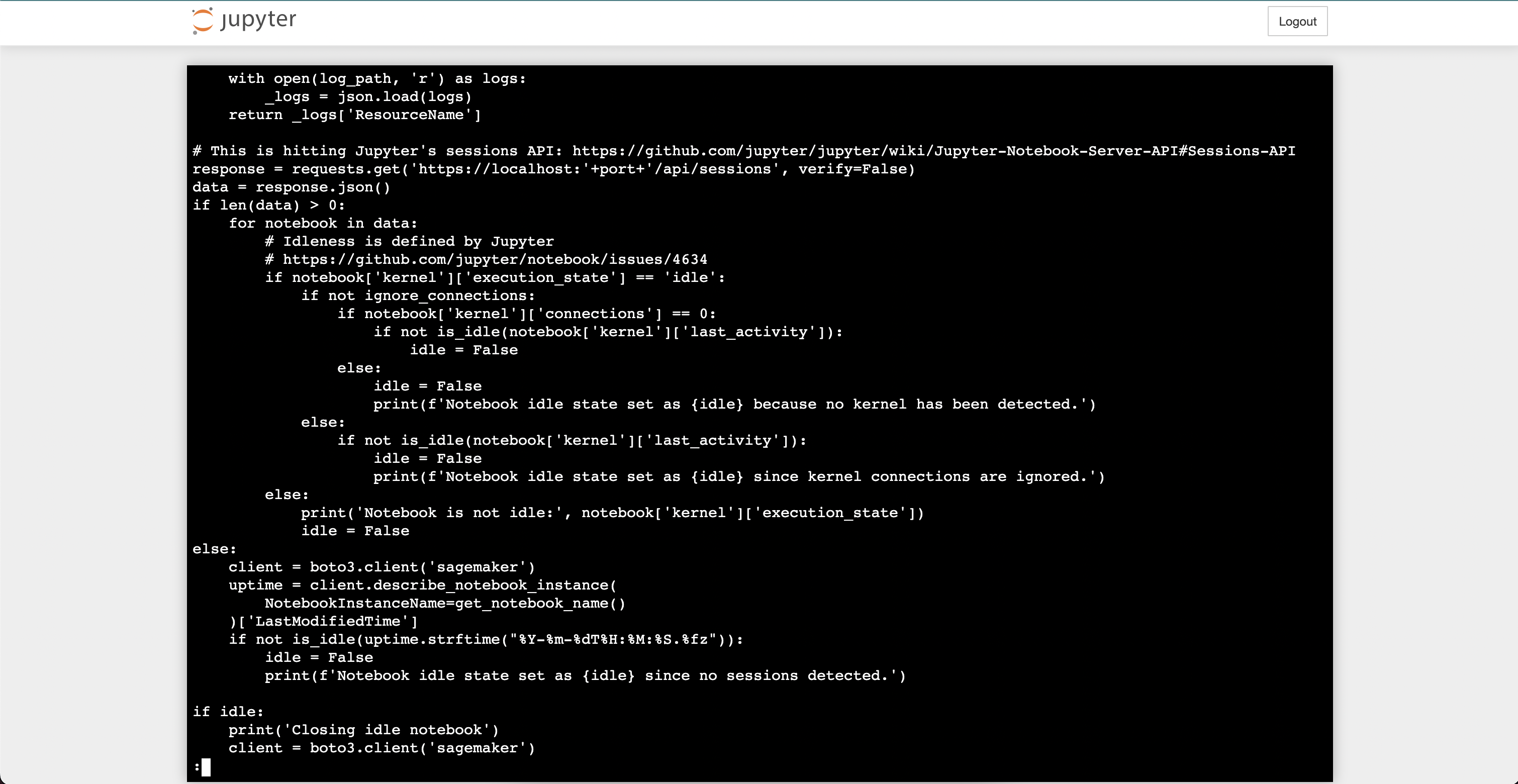
Versions (please complete the following information):
- SWB 4.3.1
About this issue
- Original URL
- State: closed
- Created 2 years ago
- Comments: 16 (9 by maintainers)
I pulled the changes committed for v5.2.5 into our forked repository, which is locked at 5.0.0 version. Auto stop works. Still not sure how the file got replaced with the one in that repo, but it’s a non-issue at the moment. Thank you! 😄
Hi! I also want to note that you may need to stop and start any affected instances after upgrade and deploying SWB v5.2.5.
If this fixes your issue, please go ahead and close this issue. I am going to mark as closing-soon-if-no-response so we will close in about 7 days if we do not hear that this did not resolve the issue.
Thank you for the report!
@srpiatt please upgrade your SWB installation to the latest release v5.2.5. Sagemaker made a change that caused all new instances to be spun up with the AL2 operating system. New Sagemaker instances will no longer be able to mount studies or autostop without the fix in v5.2.5
Yup, so I also get that problem when I try to invoke the autostop script (and my autostop script matches the SWB one). I think that is the root cause of this problem. I will add a backlog item to figure out why boto3 is not being imported correctly so that sagemaker notebooks can use them for autostop.
It still does not explain why you got the amazon-sagemaker-notebook-instance-lifecycle-config-samples in the instance. Was that only present in one instance or all instances? Is it possible someone manually changed the files when trying to debug the autostop not working?
Thanks so much for working through this with me!
Yes, I see the problem in the other repo’s commit. I am still trying to debug how the script is on your Sagemaker instance.
Got ~two~ three more questions:
/usr/bin/python /usr/local/bin/autostop.py --time 300 --ignore-connections?Yes-- none of the files on the s3 bucket were changed in several months. I also downloaded the autostop script from the bucket to verify manually that it matches the SWB repo version.