amplify-js: SignInWithApple and Amplify not working user is never authenticated (I have all lastest updates for all)
anyone has implemented signInWithApple using amplify Auth.federatedSignIn? in my case credentials are null and user is never authenticated
Auth.federatedSignIn(
          {
            provider: 'SignInWithApple',
            token: accessToken,
            expires_at: expires_at
          }, user)
          .then(credentials => {
credentials returning all the time null
if I use
Auth.currentAuthenticatedUser()
      .then(user => {
        console.log(user);
        return user;
      })
the error says user it is not authenticated i am using cognito with aws and amplify with my Cordova mobile app! With facebook and google everything works perfectly but not with apple sign in!
Anyone knows why it is not working? why credentials are null and why user is not registered? thanks
About this issue
- Original URL
- State: closed
- Created 3 years ago
- Comments: 35 (16 by maintainers)
I will and big thanks to you too! 😃
Hi there! I found the issue that was not an issue itself was a clear documentation and how to use apple sign in in amplify correctly when using it with mobile or web.
Using this it works only for web!
my code was always fine this way below but documentation in amazon / amplify is misleading and confusing! they must state to use “appleid.apple.com” that way first thing!
Second thing in cognito federated identities nobody knows which ID to use for Apple the service ID or Bundle ID. It is confusing in amplify that does not mention which one to use there it only says in a small text in amazon in the link you sent me above that for web use the bundle id while for native apps use the service ID…
So it is misleading to show enter “Apple Services ID” in federated identities -> Authentication providers -> Apple when it must say enter “Apple Services ID (for native iOS apps)” or “Bundle ID (for web)”.
it must say so:
now I get the credentials this way correctly! Credentials are not anymore undefined! the amplify error on the console was misleading to find out the issue!
It will be useful to provide in amplify a clear sample of apple sign in code in javascript as it is explained well for google and facebook with the right information using it this way to bypass the HostedUI and get credentials!
My error was using the Apple Service ID when it says Apple Service ID in federated identities -> Authentication providers -> Apple and using my Apple Bundle ID solved the issue!
Please provide clear information in amplify for the apple sign in and with the samples! and add Apple Bundle ID / Apple Service ID as shown below will help a lot:
The information must be clear anywhere in amazon documentation online and also in amplify! so nobody spend so many days to find errors that are not there! Many people making mistakes writing wrong information due to missing clear information regarding this topic!
Thanks a lot for your hard work to help solve this issue! in my case was only Use the Bundle ID instead and solved! errors from amplify are not helping too much to find the real reason of errors!
THANKS!
@rapgithub sorry about the confusion, the
federatedSignInis an overloaded method, by passing different forms of parameters it behaves differently.case1: no parameter - user pool federation
Auth.federatedSignIn(). This simply opens up a new page of the user pool “Hosted UI”.case2: directly go to third party login page - still user pool federation
Auth.federatedSignIn({provider: 'SignInWithApple'}).The above two cases allow you to federate the customer into the user pool.
case3: identity pool federation.
In this case, you need to directly set the federation in identity pool (by clicking the “edit button” of the identity pool). User federate into identity pool directly has nothing to do with user pool.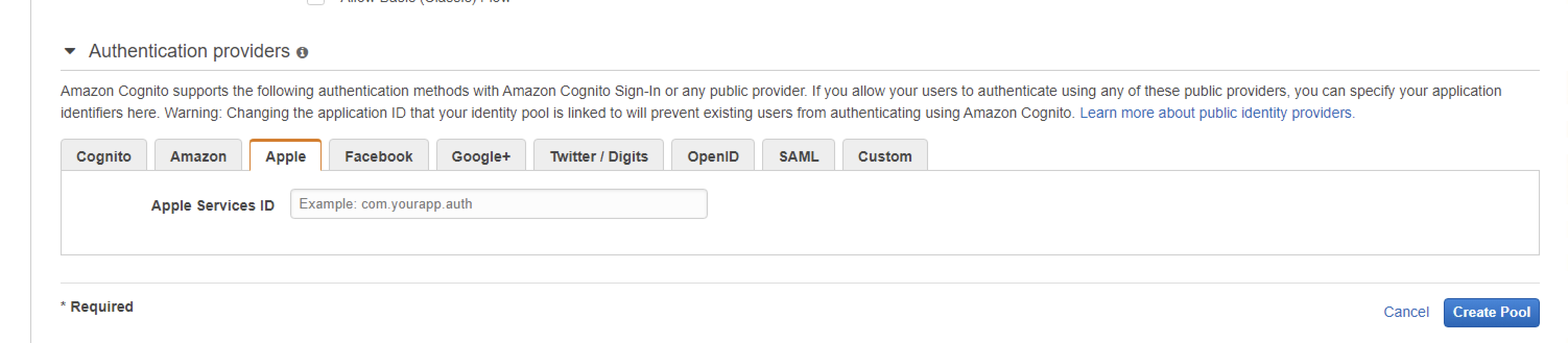
This is also the only path where you get the credentials when the promise gets resolved (e.g. by calling
then).You can follow this https://docs.aws.amazon.com/cognito/latest/developerguide/apple.html#set-up-apple-1.javascript to setup apple idp in your identity pool.
The above 3 are the only valid syntax, the call does not accept a syntax like
I would suggest you to try the case3 approach, using
appleid.apple.comas the first argument. The error you get backToken is not from a supported identity provider of this identity poolis very likely due to some misconfiguration of the identity pool.thank you I hope it can be solved! I stay tuned for updates! thanks