amplify-js: React Native - AWSS3Provider - ensure credentials error cannot get guest credentials
Before opening, please confirm:
- I have searched for duplicate or closed issues and discussions.
- I have read the guide for submitting bug reports.
- I have done my best to include a minimal, self-contained set of instructions for consistently reproducing the issue.
JavaScript Framework
React Native
Amplify APIs
Authentication, Storage
Amplify Categories
auth, storage
Environment information
System:
    OS: Linux 5.13 Ubuntu 20.04.3 LTS (Focal Fossa)
    CPU: (4) x64 Intel(R) Core(TM) i5-4570S CPU @ 2.90GHz
    Memory: 597.18 MB / 15.52 GB
    Container: Yes
    Shell: 5.8 - /usr/bin/zsh
  Binaries:
    Node: 14.18.2 - /usr/bin/node
    npm: 6.14.15 - /usr/bin/npm
    Watchman: 20220130.171601.0 - /usr/local/bin/watchman
  Browsers:
    Firefox: 96.0
  npmPackages:
    @apollo/client: ^3.5.8 => 3.5.8
    @apollo/client/cache:  undefined ()
    @apollo/client/core:  undefined ()
    @apollo/client/errors:  undefined ()
    @apollo/client/link/batch:  undefined ()
    @apollo/client/link/batch-http:  undefined ()
    @apollo/client/link/context:  undefined ()
    @apollo/client/link/core:  undefined ()
    @apollo/client/link/error:  undefined ()
    @apollo/client/link/http:  undefined ()
    @apollo/client/link/persisted-queries:  undefined ()
    @apollo/client/link/retry:  undefined ()
    @apollo/client/link/schema:  undefined ()
    @apollo/client/link/utils:  undefined ()
    @apollo/client/link/ws:  undefined ()
    @apollo/client/react:  undefined ()
    @apollo/client/react/components:  undefined ()
    @apollo/client/react/context:  undefined ()
    @apollo/client/react/hoc:  undefined ()
    @apollo/client/react/hooks:  undefined ()
    @apollo/client/react/parser:  undefined ()
    @apollo/client/react/ssr:  undefined ()
    @apollo/client/testing:  undefined ()
    @apollo/client/testing/core:  undefined ()
    @apollo/client/utilities:  undefined ()
    @apollo/client/utilities/globals:  undefined ()
    @babel/core: ^7.12.9 => 7.16.12
    @babel/runtime: ^7.12.5 => 7.16.7
    @fortawesome/fontawesome-svg-core: ^1.2.36 => 1.2.36
    @fortawesome/free-solid-svg-icons: ^5.15.4 => 5.15.4
    @fortawesome/react-native-fontawesome: ^0.2.7 => 0.2.7
    @react-native-async-storage/async-storage: ^1.15.17 => 1.15.17
    @react-native-community/eslint-config: ^2.0.0 => 2.0.0
    @react-native-community/netinfo: ^7.1.9 => 7.1.9
    @react-native-masked-view/masked-view: ^0.2.6 => 0.2.6
    @react-native-picker/picker: ^2.2.1 => 2.2.1
    @types/jest: ^26.0.23 => 26.0.24
    @types/lodash-es: ^4.17.6 => 4.17.6
    @types/luxon: ^2.0.9 => 2.0.9
    @types/react-native: ^0.66.15 => 0.66.15
    @types/react-test-renderer: ^17.0.1 => 17.0.1
    @typescript-eslint/eslint-plugin: ^5.7.0 => 5.10.2 (3.10.1)
    @typescript-eslint/parser: ^5.7.0 => 5.10.2 (3.10.1)
    HelloWorld:  0.0.1
    amazon-cognito-identity-js: ^5.2.6 => 5.2.6
    aws-amplify: ^4.3.14 => 4.3.14
    aws-amplify-react-native: ^6.0.2 => 6.0.2
    babel-jest: ^26.6.3 => 26.6.3
    eslint: ^7.14.0 => 7.32.0
    graphql: ^16.3.0 => 16.3.0 (15.8.0)
    hermes-inspector-msggen:  1.0.0
    intl: ^1.2.5 => 1.2.5
    jest: ^26.6.3 => 26.6.3
    lodash-es: ^4.17.21 => 4.17.21
    luxon: ^2.3.0 => 2.3.0
    metro-react-native-babel-preset: ^0.66.2 => 0.66.2
    native-base: ^3.3.4 => 3.3.4
    react: 17.0.2 => 17.0.2
    react-native: 0.67.1 => 0.67.1
    react-native-device-info: ^8.4.9 => 8.4.9
    react-native-linear-gradient: ^2.5.6 => 2.5.6
    react-native-safe-area-context: ^3.3.2 => 3.3.2
    react-native-skeleton-placeholder: ^5.0.0 => 5.0.0
    react-native-svg: ^12.1.1 => 12.1.1
    react-router-native: ^6.2.1 => 6.2.1
    react-test-renderer: 17.0.2 => 17.0.2
    rn-fetch-blob: ^0.12.0 => 0.12.0
    typescript: ^4.4.4 => 4.5.5
  npmGlobalPackages:
    @angular/cli: 13.1.2
    eslint: 7.29.0
    npm: 6.14.15
    webpack-bundle-analyzer: 4.5.0
Describe the bug
After authentication using the aws-amplify-react-native library, a call to Storage.get with values that work on web throws:
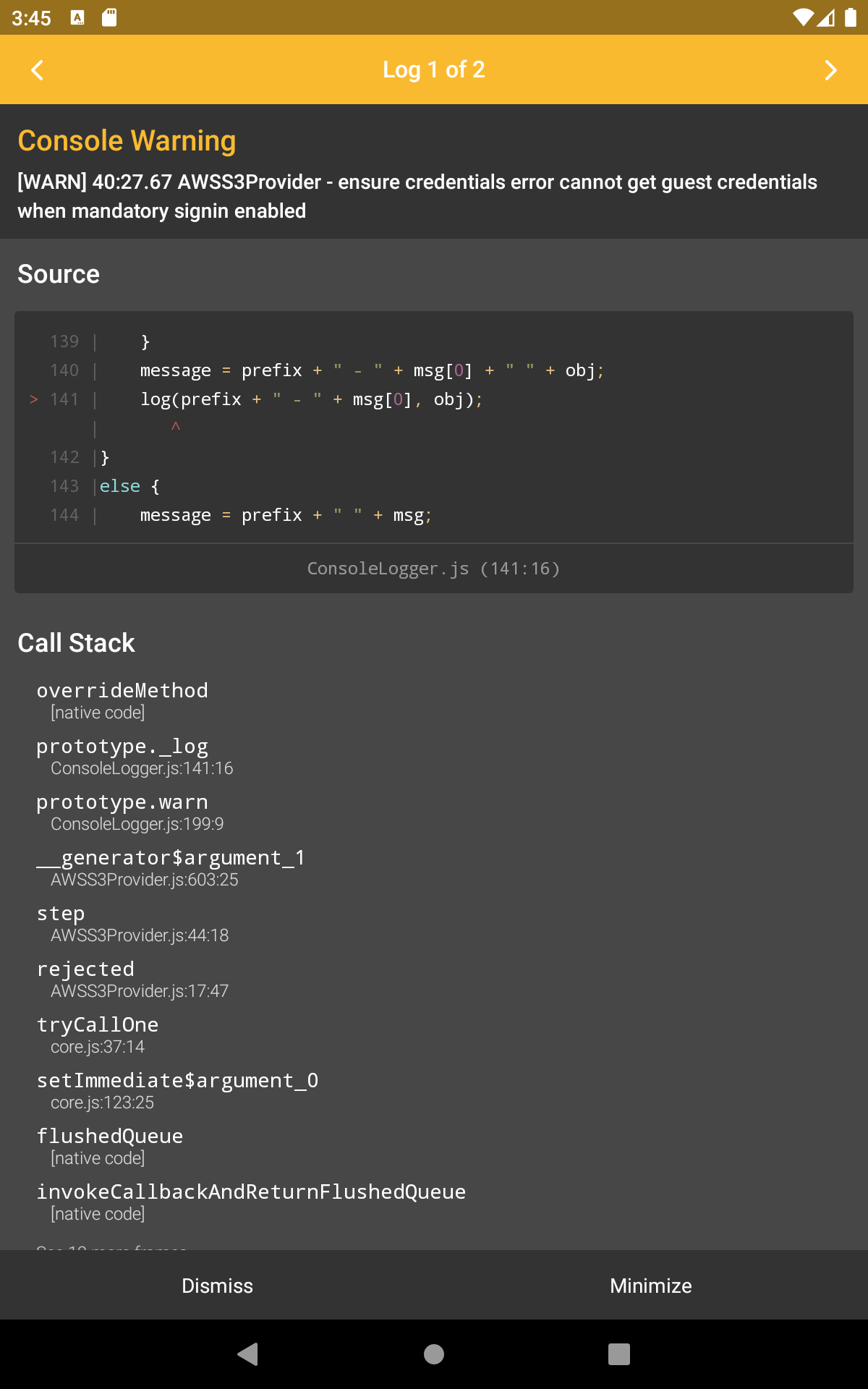
AWSS3Provider - ensure credentials error cannot get guest credentials when mandatory signin enabled
This appears similar to issues #1273 and #6096, which were resolved in updated versions of the library. This leads me to believe that this fix has perhaps not been migrated to aws-amplify-react-native, because I previously encountered an issue with that library’s use of a deprecated AsyncStorage module, which required a workaround.
Expected behavior
After logging in through the Auth library, Storage.get should make use of the session.
Reproduction steps
- Install
aws-amplifyandaws-amplify-react-nativein a React Native project. - Configure Amplify for Cognito and S3.
- Use
Authto sign in through Cognito. - Attempt to connect to S3 through the Storage library.
Code Snippet
import {environment} from '../../environment';
import Amplify from 'aws-amplify';

// ...

const region = 'us-east-1';
Amplify.configure({
  Auth: {
    region,
    identityPoolId: environment.cognito.IdentityPoolId,
    userPoolId: environment.cognito.UserPoolId,
    userPoolWebClientId: environment.cognito.ClientId,
    authenticationFlowType: 'USER_PASSWORD_AUTH',
    mandatorySignIn: true,
  },
  Storage: {
    AWSS3: {
      bucket: environment.s3.Bucket,
      region,
      customPrefix: {
        public: '',
      },
    },
  },
});

// ... After sign in through Cognito
const rawFiles: S3ProviderListOutputItem[] = await Storage.list('[s3-url]');
// Error thrown
Log output
WARN [WARN] 40:27.67 AWSS3Provider - ensure credentials error cannot get guest credentials when mandatory signin enabled
ERROR [Error: No credentials]
aws-exports.js
No response
Manual configuration
No response
Additional configuration
No response
Mobile Device
Android emulator
Mobile Operating System
Android 11
Mobile Browser
No response
Mobile Browser Version
No response
Additional information and screenshots
About this issue
- Original URL
- State: closed
- Created 2 years ago
- Reactions: 1
- Comments: 33 (14 by maintainers)
@calebpollman here’s the dependencies: