amplify-js: Missing ID Token in `Logins` during federatedSignIn
Before opening, please confirm:
- I have searched for duplicate or closed issues and discussions.
- I have read the guide for submitting bug reports.
- I have done my best to include a minimal, self-contained set of instructions for consistently reproducing the issue.
JavaScript Framework
Not applicable
Amplify APIs
Authentication
Amplify Categories
auth
Environment information
# Put output below this line
Describe the bug
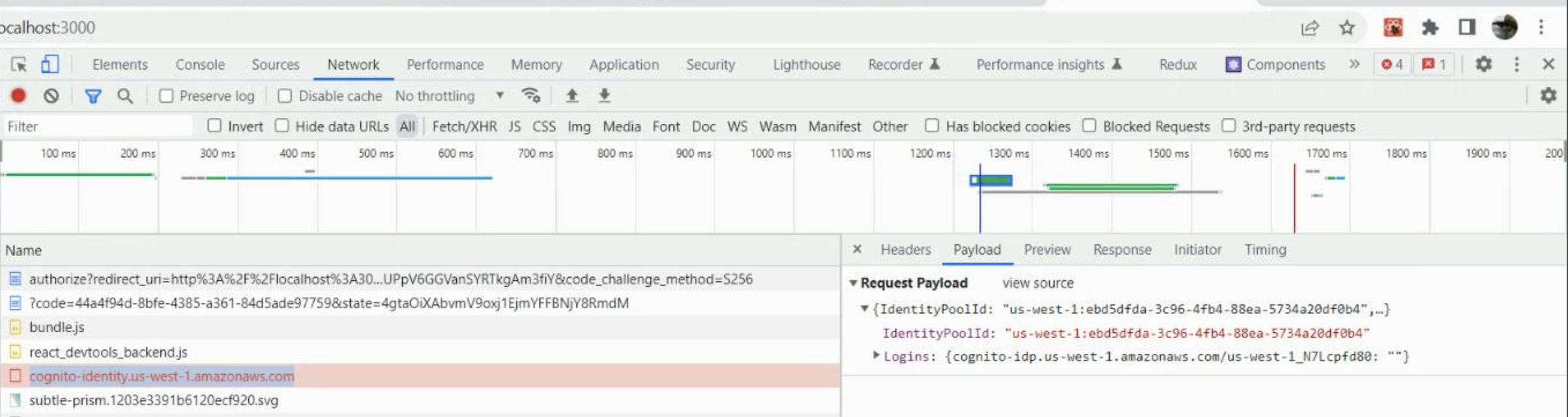
When attempting to authenticate with Amplify.federatedSignIn, with a responseType of code, the request made to https://cognito-identity.us-east-1.amazonaws.com/ is missing the ID Token from Logins within the payload.
This results in an empty string being sent in the payload and this error being returned from Cognito.
Expected behavior
ID Token should be sent in the payload and the user should finish the OAuth flow and be authenticated
Reproduction steps
- Configure auth resource with OAuth flow enabled with responseType of
code - Configure social providers or OIDC
- Attempt to sign in as federated user
Code Snippet
// Put your code below this line.
Log output
// Put your logs below this line
Credentials - Error loading credentials ValidationException: 1 validation error detected: Value '{cognito-idp.us-west-1.amazonaws.com/us-west-1_N7Lcpfd80=}' at 'logins' failed to satisfy constraint: Map value must satisfy constraint: [Member must have length less than or equal to 50000, Member must have length greater than or equal to 1]
aws-exports.js
No response
Manual configuration
No response
Additional configuration
No response
Mobile Device
No response
Mobile Operating System
No response
Mobile Browser
No response
Mobile Browser Version
No response
Additional information and screenshots
About this issue
- Original URL
- State: closed
- Created 2 years ago
- Reactions: 3
- Comments: 25 (11 by maintainers)
My issue was resolved because I was calling
Amplify.configuretwice inside an environment script with outdated redirect URLs once our domain changed. This error wasn’t exposed so it was hard to find the error, but for anyone else having issues, check if you are re-configuring amplify somewhere else in your app.Hi @billygerhard @dafran7,
We tried the configuration as described in the Amplify docs here and were able to get the app to work on Amplify hosting. I’ve pasted our code below in case that helps. We think the primary issue is with overriding awsConfig Auth and oauth completely instead of overriding the values that need to be changed. There may also be an issue with the isDevMode() method, depending on how you are implementing.
Hope this helps!
Debugging further. The OAuth flow is correct until the /oauth2/token.
Response: { access_token: […], refresh_token: […], expires_in: 3600, token_type: “Bearer”}
The response is missing the id_token.
From https://aws.amazon.com/blogs/mobile/understanding-amazon-cognito-user-pool-oauth-2-0-grants/, it appears that “id_token – A valid user pool ID token. Note that an ID token is only provided if the openid scope was requested.”
Adding the openid scope to the Allowed OAuth Scopes of the Cognito User Pool Appclient solved the issue.
It is not allowed in the current Cognito interfaces (web console/cloudformation) to add the email scope without the openid scope. The User Pool used when the issue appeared was created years ago when, I presume that the interface was allowing it at that time.
Is it normal that Auth idtoken is null when the openid scope is not specified in the Cognito User Pool AppClient? I suppose so. I cannot reproduce the issue anymore since all my App Clients specify email+openid scopes and currently the interfaces (web console or cloud formation) do not allow having email scope without openid scope.
It is required also to add the openid scope in the Amplify / Auth configuration.
Auth: { [...] oauth: { domain: "yourdomain.auth.eu-west-1.amazoncognito.com", scope: ['email', 'openid'], redirectSignIn: "http://localhost:12500/", redirectSignOut: "http://localhost:12500/", responseType: "code" } },