amplify-js: DataStore queries don't do anything on the first load of the application

Describe the bug After newest update, DataStore queries don’t do anything on the first load of the react-native application. Only on the second load, it starts to work properly.

To Reproduce Steps to reproduce the behavior:

  1. Open react-native application
  2. Sign in with a user
  3. Try to get some data with DataStore.query(Something)
  4. Don’t get anything (well it spits empty arrays, so I don’t think that it does anything good)
  5. Close application.
  6. Open application again
  7. Now everything works

Expected behavior Expecting some data on the first load, as it worked before.

Code Snippet Standard DataStore.query(SomeDataToQuery)

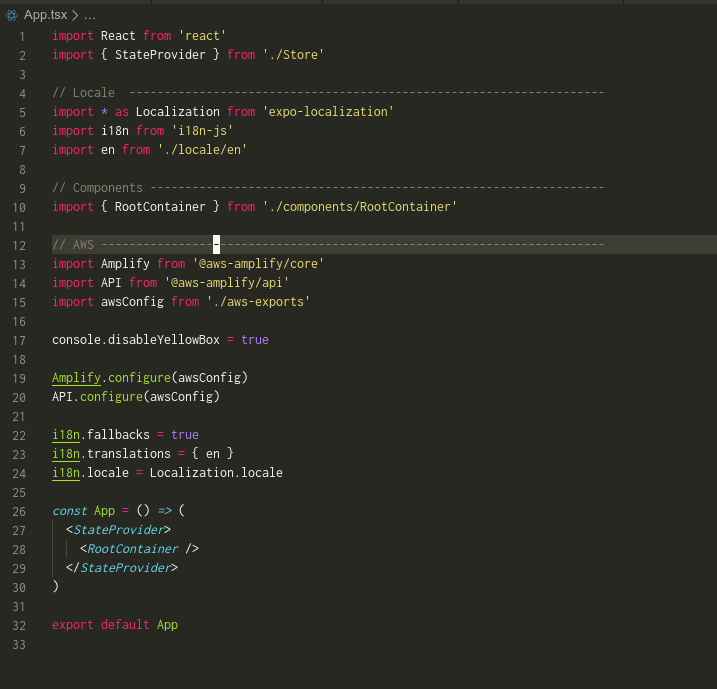
What is Configured? 20200603_155241

20200603_155423

It worked on this version:

    "@aws-amplify/api": "3.1.12",
    "@aws-amplify/auth": "3.2.9",
    "@aws-amplify/cache": "3.1.12",
    "@aws-amplify/core": "3.2.9",
    "@aws-amplify/datastore": "2.1.2",
    "@aws-amplify/pubsub": "3.0.13",
    "@aws-amplify/storage": "3.2.2",

Now it doesn’t:

    "@aws-amplify/api": "3.1.14-unstable.2",
    "@aws-amplify/auth": "3.2.11-unstable.2",
    "@aws-amplify/cache": "3.1.14-unstable.2",
    "@aws-amplify/core": "3.3.1-unstable.2",
    "@aws-amplify/datastore": "2.2.1-unstable.2",
    "@aws-amplify/pubsub": "3.0.15-unstable.2",
    "@aws-amplify/storage": "3.2.4-unstable.2",

Additional context Few other guys are getting the same issue, you can find more on discord channel for amplify-js. Running a react-native application.

About this issue

  • Original URL
  • State: closed
  • Created 4 years ago
  • Comments: 15 (5 by maintainers)

Commits related to this issue

Most upvoted comments

Hi @Darapsas and @nubpro

When enabling syncing to the cloud on the DataStore, queries you run might yield empty or incomplete results if the initial sync process hasn’t completed or there is not enough data synced locally at the time of the query. In this scenario, you can either wait for the sync process to finish (by listening to the 'ready' event on the 'datastore' Hub channel) or you can observe a model until you accumulate enough data to render your UI.

Below you’ll find these two approaches exemplified:

Waiting for the sync process to finish

import React, { useEffect, useState } from "react";
 
import { Amplify, Hub } from "@aws-amplify/core";
import { DataStore, Predicates } from "@aws-amplify/datastore";
 
import awsConfig from "./aws-exports";
import { Note } from "./models";
 
Amplify.configure(awsConfig);
 
function App() {
  const [notes, setNotes] = useState([] as Note[]);
 
  useEffect(() => {
    // Create listener that will stop observing the model once the sync process is done
    const removeListener = Hub.listen("datastore", async (capsule) => {
      const {
        payload: { event, data },
      } = capsule;
 
      console.log("DataStore event", event, data);
 
      if (event === "ready") {
        const notes = await DataStore.query(Note, Predicates.ALL, {
          page: 0,
          limit: 15,
        });
 
        setNotes(notes);
      }
    });
 
    // Start the DataStore, this kicks-off the sync process.
    DataStore.start();
 
    return () => {
      removeListener();
    };
  }, []);
 
  return (
    <div>
      <ul>
        {notes.map((note) => (
          <li key={note.id}>{note.id}</li>
        ))}
      </ul>
    </div>
  );
}

Observing a Model until enough data is available

import React, { useEffect, useState } from "react";
 
import { Amplify, Hub } from "@aws-amplify/core";
import { DataStore, Predicates } from "@aws-amplify/datastore";
 
import awsConfig from "./aws-exports";
import { Note } from "./models";
 
Amplify.configure(awsConfig);
 
function App() {
  const [notes, setNotes] = useState([] as Note[]);
 
  // Number of notes we want to show in our initial render
  const limit = 15;
 
  useEffect(() => {
    let subscription: any = undefined;
 
    // Create listener that will stop observing the model once the sync process is done
    const removeListener = Hub.listen("datastore", (capsule) => {
      const {
        payload: { event, data },
      } = capsule;
 
      console.log("DataStore event", event, data);
 
      if (event === "ready") {
        if (subscription) {
          removeListener();
        }
      }
    });
 
    // Async IIFE for more convenient async/await syntax
    // see: https://developer.mozilla.org/en-US/docs/Web/JavaScript/Reference/Operators/async_function#Description
    (async () => {
      const notes = await DataStore.query(Note, Predicates.ALL, {
        page: 0,
        limit: limit,
      });
 
      if (notes.length === limit) {
        setNotes(notes);
        return;
      }
 
      // If we didn't get enough data from the initial query, observe the model until we do
      subscription = DataStore.observe(Note).subscribe(({ element, ...x }) => {
        notes.push(element);
 
        if (notes.length === limit) {
          subscription.unsubscribe();
 
          setNotes(notes);
        }
      });
    })();
 
    return () => {
      // We clean up the hub listener and the observe subscription
 
      removeListener();
 
      if (subscription) {
        subscription.unsubscribe();
      }
    };
  }, []);
 
  return (
    <div>
      <ul>
        {notes.map((note) => (
          <li key={note.id}>{note.id}</li>
        ))}
      </ul>
    </div>
  );
}
 
export default App;

@mdoesburg The publish to npm just finished, try again, these are the versions:

Successfully published:
 
 - amazon-cognito-identity-js@4.3.2-unstable.6+b5347ab62
 - @aws-amplify/ui-angular@0.2.8-unstable.13+b5347ab62
 - @aws-amplify/ui-components@0.5.2-unstable.13+b5347ab62
 - @aws-amplify/ui-react@0.2.9-unstable.13+b5347ab62
 - @aws-amplify/ui-vue@0.2.8-unstable.13+b5347ab62
 - @aws-amplify/ui@2.0.3-unstable.186+b5347ab62
 - @aws-amplify/analytics@3.1.16-unstable.2+b5347ab62
 - @aws-amplify/api-graphql@1.0.18-unstable.2+b5347ab62
 - @aws-amplify/api-rest@1.0.18-unstable.2+b5347ab62
 - @aws-amplify/api@3.1.16-unstable.2+b5347ab62
 - @aws-amplify/auth@3.2.13-unstable.2+b5347ab62
 - aws-amplify-angular@5.0.17-unstable.2+b5347ab62
 - aws-amplify-react-native@4.2.1-unstable.27+b5347ab62
 - aws-amplify-react@4.1.16-unstable.2+b5347ab62
 - aws-amplify-vue@2.1.2-unstable.186+b5347ab62
 - aws-amplify@3.0.17-unstable.2+b5347ab62
 - @aws-amplify/cache@3.1.16-unstable.2+b5347ab62
 - @aws-amplify/core@3.3.3-unstable.2+b5347ab62
 - @aws-amplify/datastore@2.2.3-unstable.2+b5347ab62
 - @aws-amplify/interactions@3.1.16-unstable.2+b5347ab62
 - @aws-amplify/predictions@3.1.16-unstable.2+b5347ab62
 - @aws-amplify/pubsub@3.0.17-unstable.2+b5347ab62
 - @aws-amplify/pushnotification@3.1.3-unstable.2+b5347ab62
 - @aws-amplify/storage@3.2.6-unstable.2+b5347ab62
 - @aws-amplify/xr@2.1.16-unstable.2+b5347ab62

@manueliglesias Nevermind I figured out I can listen to the outboxStatus event: outboxStatus {"isEmpty": false}