amplify-js: Custom auth lambda trigger is not configured for the user pool -> on Sign Up Confirmation
Describe the bug Using the @aws-amplify/ui-react AmplifyAuthenticator and AmplifySignUp components to generate a custom Sign-Up page works as expected. However, when a user attempts to confirm sign-up by supplying the correct code, we receive the “Custom auth lambda trigger is not configured for the user pool” error, and the Application does not automatically sign-in the user. The user’s confirmation is processed correctly, and can sign-in as expected, but the error is confusing.
To Reproduce Steps to reproduce the behavior:
- Generate a simple react app (create-react-app …) for Amplify
- Add Auth to the Amplify App (amplify add auth)
- Create a conditional app rendering setup for the application
- Sign Up a New user
- Once the new user attempts to confirm the sign-up, you should receive the error in the Title.
Expected behavior The error should not occur.
Code Snippet Please provide a code snippet or a link to sample code of the issue you are experiencing to help us reproduce the issue. (Be sure to remove any sensitive data)
AppWithAuth.js
import React from "react";
import App from "./App";
import Amplify from 'aws-amplify';
import { AmplifyAuthenticator, AmplifySignUp, AmplifySignIn } from "@aws-amplify/ui-react";
import { AuthState, onAuthUIStateChange } from '@aws-amplify/ui-components';
import awsconfig from './aws-exports';

Amplify.configure(awsconfig);

const AppWithAuth = () => {
    const [authState, setAuthState] = React.useState();
    const [user, setUser] = React.useState();

    React.useEffect(() => {
        return onAuthUIStateChange((nextAuthState, authData) => {
            setAuthState(nextAuthState);
            setUser(authData)
        });
    }, []);

  return authState === AuthState.SignedIn && user ? (
      <App />
    ) : (
        <AmplifyAuthenticator usernameAlias="email">
            <AmplifySignUp
                slot="sign-up"
                usernameAlias="email"
                formFields={[
                {
                    type: "email",
                    label: "Email Address",
                    required: true,
                },
                {
                    type: "password",
                    label: "Password",
                    placeholder: "********************",
                    required: true,
                },
                {
                    type: "given_name",
                    label: "First Name",
                    required: false,
                },
                {
                    type: "family_name",
                    label: "Last Name",
                    required: false,
                },
                {
                    type: "custom:team",
                    label: "Team",
                    required: true,
                },
                ]}
            />
            <AmplifySignIn slot="sign-in" usernameAlias="email" />
        </AmplifyAuthenticator>
  );
}

export default AppWithAuth;
Screenshots
If applicable, add screenshots to help explain your problem.
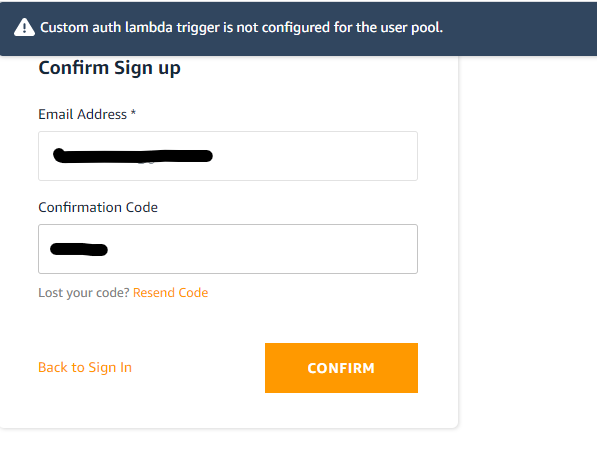
What is Configured? If applicable, please provide what is configured for Amplify CLI:
- Which steps did you follow via Amplify CLI when configuring your resources.
amplify init
amplify add api
amplify api add-graphql-datasource
- Which resources do you have configured?
- GraphQL API (Aurora Serverless)
- Auth (Cognito User Pool)
- If applicable, please provide your
aws-exportsfile:
const awsmobile = {
 "aws_project_region": "us-east-1",
 "aws_cognito_identity_pool_id": "us-east-1:f060f756-2ec8-4d3e-9787-eeb5491821c6",
 "aws_cognito_region": "us-east-1",
 "aws_user_pools_id": "us-east-1_5oWJ8fsKk",
 "aws_user_pools_web_client_id": "3j4rfqlkjug7vl3ufbglbto4u0",
 "oauth": {},
 "aws_appsync_graphqlEndpoint": "https://qwfocb4jqvauxdkiosltdazhiu.appsync-api.us-east-1.amazonaws.com/graphql",
 "aws_appsync_region": "us-east-1",
 "aws_appsync_authenticationType": "AMAZON_COGNITO_USER_POOLS"
};
-
If applicable, please provide your manual configuration example: N/A
-
If applicable, provide more configuration data, for example for Amazon Cognito, run
aws cognito-idp describe-user-pool --user-pool-id us-west-2_xxxxxx(Be sure to remove any sensitive data)
{
    "UserPool": {
        "Id": "us-east-1_XXXXX",
        "Name": "XXXX",
        "Policies": {
            "PasswordPolicy": {
                "MinimumLength": 8,
                "RequireUppercase": false,
                "RequireLowercase": false,
                "RequireNumbers": false,
                "RequireSymbols": false,
                "TemporaryPasswordValidityDays": 7
            }
        },
        "LambdaConfig": {},
        "LastModifiedDate": "2020-07-14T16:03:15.300000-07:00",
        "CreationDate": "2020-07-14T09:52:56.864000-07:00",
        "SchemaAttributes": [
            {
                "Name": "sub",
                "AttributeDataType": "String",
                "DeveloperOnlyAttribute": false,
                "Mutable": false,
                "Required": true,
                "StringAttributeConstraints": {
                    "MinLength": "1",
                    "MaxLength": "2048"
                }
            },
            {
                "Name": "name",
                "AttributeDataType": "String",
                "DeveloperOnlyAttribute": false,
                "Mutable": true,
                "Required": false,
                "StringAttributeConstraints": {
                    "MinLength": "0",
                    "MaxLength": "2048"
                }
            },
            {
                "Name": "given_name",
                "AttributeDataType": "String",
                "DeveloperOnlyAttribute": false,
                "Mutable": true,
                "Required": false,
                "StringAttributeConstraints": {
                    "MinLength": "0",
                    "MaxLength": "2048"
                }
            },
            {
                "Name": "family_name",
                "AttributeDataType": "String",
                "DeveloperOnlyAttribute": false,
                "Mutable": true,
                "Required": false,
                "StringAttributeConstraints": {
                    "MinLength": "0",
                    "MaxLength": "2048"
                }
            },
            {
                "Name": "middle_name",
                "AttributeDataType": "String",
                "DeveloperOnlyAttribute": false,
                "Mutable": true,
                "Required": false,
                "StringAttributeConstraints": {
                    "MinLength": "0",
                    "MaxLength": "2048"
                }
            },
            {
                "Name": "nickname",
                "AttributeDataType": "String",
                "DeveloperOnlyAttribute": false,
                "Mutable": true,
                "Required": false,
                "StringAttributeConstraints": {
                    "MinLength": "0",
                    "MaxLength": "2048"
                }
            },
            {
                "Name": "preferred_username",
                "AttributeDataType": "String",
                "DeveloperOnlyAttribute": false,
                "Mutable": true,
                "Required": false,
                "StringAttributeConstraints": {
                    "MinLength": "0",
                    "MaxLength": "2048"
                }
            },
            {
                "Name": "profile",
                "AttributeDataType": "String",
                "DeveloperOnlyAttribute": false,
                "Mutable": true,
                "Required": false,
                "StringAttributeConstraints": {
                    "MinLength": "0",
                    "MaxLength": "2048"
                }
            },
            {
                "Name": "picture",
                "AttributeDataType": "String",
                "DeveloperOnlyAttribute": false,
                "Mutable": true,
                "Required": false,
                "StringAttributeConstraints": {
                    "MinLength": "0",
                    "MaxLength": "2048"
                }
            },
            {
                "Name": "website",
                "AttributeDataType": "String",
                "DeveloperOnlyAttribute": false,
                "Mutable": true,
                "Required": false,
                "StringAttributeConstraints": {
                    "MinLength": "0",
                    "MaxLength": "2048"
                }
            },
            {
                "Name": "email",
                "AttributeDataType": "String",
                "DeveloperOnlyAttribute": false,
                "Mutable": true,
                "Required": true,
                "StringAttributeConstraints": {
                    "MinLength": "0",
                    "MaxLength": "2048"
                }
            },
            {
                "Name": "email_verified",
                "AttributeDataType": "Boolean",
                "DeveloperOnlyAttribute": false,
                "Mutable": true,
                "Required": false
            },
            {
                "Name": "gender",
                "AttributeDataType": "String",
                "DeveloperOnlyAttribute": false,
                "Mutable": true,
                "Required": false,
                "StringAttributeConstraints": {
                    "MinLength": "0",
                    "MaxLength": "2048"
                }
            },
            {
                "Name": "birthdate",
                "AttributeDataType": "String",
                "DeveloperOnlyAttribute": false,
                "Mutable": true,
                "Required": false,
                "StringAttributeConstraints": {
                    "MinLength": "10",
                    "MaxLength": "10"
                }
            },
            {
                "Name": "zoneinfo",
                "AttributeDataType": "String",
                "DeveloperOnlyAttribute": false,
                "Mutable": true,
                "Required": false,
                "StringAttributeConstraints": {
                    "MinLength": "0",
                    "MaxLength": "2048"
                }
            },
            {
                "Name": "locale",
                "AttributeDataType": "String",
                "DeveloperOnlyAttribute": false,
                "Mutable": true,
                "Required": false,
                "StringAttributeConstraints": {
                    "MinLength": "0",
                    "MaxLength": "2048"
                }
            },
            {
                "Name": "phone_number",
                "AttributeDataType": "String",
                "DeveloperOnlyAttribute": false,
                "Mutable": true,
                "Required": false,
                "StringAttributeConstraints": {
                    "MinLength": "0",
                    "MaxLength": "2048"
                }
            },
            {
                "Name": "phone_number_verified",
                "AttributeDataType": "Boolean",
                "DeveloperOnlyAttribute": false,
                "Mutable": true,
                "Required": false
            },
            {
                "Name": "address",
                "AttributeDataType": "String",
                "DeveloperOnlyAttribute": false,
                "Mutable": true,
                "Required": false,
                "StringAttributeConstraints": {
                    "MinLength": "0",
                    "MaxLength": "2048"
                }
            },
            {
                "Name": "updated_at",
                "AttributeDataType": "Number",
                "DeveloperOnlyAttribute": false,
                "Mutable": true,
                "Required": false,
                "NumberAttributeConstraints": {
                    "MinValue": "0"
                }
            },
            {
                "Name": "custom:team",
                "AttributeDataType": "String",
                "DeveloperOnlyAttribute": false,
                "Mutable": true,
                "Required": false,
                "StringAttributeConstraints": {
                    "MinLength": "1",
                    "MaxLength": "256"
                }
            }
        ],
        "AutoVerifiedAttributes": [
            "email"
        ],
        "UsernameAttributes": [
            "email"
        ],
        "SmsVerificationMessage": "Your verification code is {####}",
        "EmailVerificationMessage": "Your verification code is {####}",
        "EmailVerificationSubject": "Your verification code",
        "VerificationMessageTemplate": {
            "SmsMessage": "Your verification code is {####}",
            "EmailMessage": "Your verification code is {####}",
            "EmailSubject": "Your verification code",
            "DefaultEmailOption": "CONFIRM_WITH_CODE"
        },
        "MfaConfiguration": "OFF",
        "EstimatedNumberOfUsers": 1,
        "EmailConfiguration": {
            "EmailSendingAccount": "COGNITO_DEFAULT"
        },
        "SmsConfiguration": {
            "SnsCallerArn": "arn:aws:iam::XXX:role/sns1df7f03a84650-authupdate",
            "ExternalId": "sdtimp1df7f03a_role_external_id"
        },
        "UserPoolTags": {},
        "AdminCreateUserConfig": {
            "AllowAdminCreateUserOnly": false,
            "UnusedAccountValidityDays": 7
        },
        "Arn": "arn:aws:cognito-idp:us-east-1:XXX:userpool/us-east-1_XXX",
        "AccountRecoverySetting": {}
    }
}
Environment
npx envinfo --system --binaries --browsers --npmPackages --npmGlobalPackages

npx: installed 1 in 1.991s

  System:
    OS: Linux 4.4 Ubuntu 18.04.4 LTS (Bionic Beaver)
    CPU: (8) x64 Intel(R) Core(TM) i7-8665U CPU @ 1.90GHz
    Memory: 4.45 GB / 15.81 GB
    Shell: 4.4.20 - /bin/bash
  Binaries:
    Node: 14.5.0 - /usr/local/bin/node
    npm: 6.14.5 - /usr/local/bin/npm
  npmPackages:
    @aws-amplify/ui-react: ^0.2.11 => 0.2.11
    @material-ui/core: ^4.11.0 => 4.11.0
    @material-ui/lab: ^4.0.0-alpha.56 => 4.0.0-alpha.56
    @react-pdf/renderer: ^2.0.0-beta.6 => 2.0.0-beta.6
    @testing-library/jest-dom: ^4.2.4 => 4.2.4
    @testing-library/react: ^9.5.0 => 9.5.0
    @testing-library/user-event: ^7.2.1 => 7.2.1
    aws-amplify: ^3.0.20 => 3.0.20
    babel-eslint: ^10.1.0 => 10.1.0
    eslint-config-react-app: ^5.2.1 => 5.2.1
    eslint-plugin-flowtype: ^5.2.0 => 5.2.0
    eslint-plugin-import: ^2.22.0 => 2.22.0
    eslint-plugin-jsx-a11y: ^6.3.1 => 6.3.1
    eslint-plugin-react: ^7.20.3 => 7.20.3
    eslint-plugin-react-hooks: ^4.0.8 => 4.0.8
    glamor: ^2.20.40 => 2.20.40
    prop-types: ^15.7.2 => 15.7.2
    react: ^16.13.1 => 16.13.1
    react-dom: ^16.13.1 => 16.13.1
    react-router-dom: ^5.2.0 => 5.2.0
    react-scripts: 3.4.1 => 3.4.1
  npmGlobalPackages:
    depcheck: 1.0.0
    npm: 6.14.5
Smartphone (please complete the following information):
N/A
Additional context See attached for debug information. debug.txt
You can turn on the debug mode to provide more info for us by setting window.LOG_LEVEL = ‘DEBUG’; in your app.
About this issue
- Original URL
- State: closed
- Created 4 years ago
- Reactions: 2
- Comments: 23 (8 by maintainers)
I’m also facing this issue. Here is my code:
Error message:
This error happens after confirming sign up.
I am facing this as well - almost identical scenario to the OP.
Ok, I wasn’t able to reproduce with sign up via username, but I was able to reproduce with sign up via email.
@duwerq, your investigation is really thorough and highlights part of the root cause. For some reason the password field value is not being passed properly to the confirm sign up form. Thank you for sharing all of your findings!
I am working on a fix ASAP. Thank you all for your patience.
Workaround! Use the “AmplifyConfirmSignUp” and force the user to type the password again, and process should work as expected. Looks like when you submit the form without password, it get’s identified as “CUSTOM”
Any update on this?
We have released a fix for this bug. Please test the latest version of the UI library and confirm that the fix works!
How I’m fixing this now is using the Hub to listen for auth event changes, specifically the one that has the custom auth error message. How my code looks:
The loginAfterConfrim route is the same as my login page, but it resets the
AmplifyAuthenticatorto the signIn initialStateHmm, any news? We need a solution for this issue.
I don’t know if this is helpful, but when digging around I came across this pr -> https://github.com/aws-amplify/amplify-js/commit/528466e8000cffc3ee4340a03798f4a01ace0022#diff-01dcb02e57a6e70dff551961f32338c5
I can not seem to understand why the password disappears from
signUpAttrs: this.signUpAttributeswhen passing the data from amplify-sign-up to to amplify-confirm-sign-up viahandleAuthStateChangewith amplify-authenticator.When amplify-confirm-sign-up calls the
confirmSignUpmethod, it has thethis._signUpAttrsbut they only contain the following, without the password:Because the
this._signUpAttrsexist but without password, it ends up callinghandleSignInwhich calls Auth.signIn without a password, leading to calling thethis.signInWithoutPasswordthat sets the authenticationFlowType to 'CUSTOM_AUTH`. Code here -> https://github.com/aws-amplify/amplify-js/blob/794c1da170cd98d3def4651751b851f28810bb6e/packages/auth/src/Auth.tsAnd the request being made that fails with the error described by the OP:
That was a doozy, I hope this is more helpful than not 😅