amplify-js: auth w/ Google Federation - Access Token does not have required scopes
Describe the bug
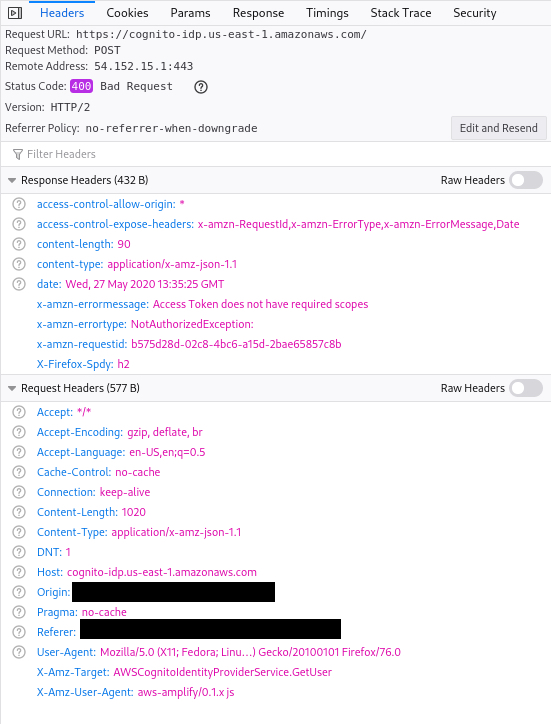
Upgraded from "@aws-amplify/auth": "3.2.7" to "@aws-amplify/auth": "3.2.8" and a federated login with Google stopped working with a 400 error from Cognito.
I initially upgraded to 3.2.8, and then downgraded back to 3.2.7, and downgrading has resolved the error. None of the dependency versions for "@aws-amplify/auth" were changed during the downgrade, so I believe the bug is specifically within the auth package.
Likely related to:
- @aws-amplify/auth: Fix OAuth multiple scopes (#5850) (f89e545)
- @aws-amplify/auth: Fix OAuth scopes (#5844) (e71fee5)
To Reproduce
Using "@aws-amplify/auth": "3.2.8", login with a federated user and retrieve the session.
Expected behavior It doesn’t 400 and passes the scopes correctly.
Code Snippet
Screenshots
What is Configured?
Smartphone (please complete the following information):
- Device: Mac
- OS: OSX 10.15.4
- Browser: Chrome
- Version: 81.0.4044.138
Additional context
About this issue
- Original URL
- State: closed
- Created 4 years ago
- Reactions: 5
- Comments: 22 (6 by maintainers)
How can Amazon, AWS and Cognito have a javascript client with 642 open issues, and a major issue like this that affects Cognito opened 8 months ago that hasn’t had any activity in over a month?
Last update from me:
I have been testing Allowed OAuth Scopes and I fixed my problem: For some reason, the hosted UI for both email and password and SSO, as well as the
Auth.federatedSignIn({provider: 'Google'})call require theaws.cognito.signin.user.adminscope to be enabled to fetch and update user attributed. However, a call toAuth.signIn(email, password)does not. I don’t fully understand why though, as the documentation doesn’t seem to mention this.This is not a bug with amplify per-se, it’s an issue with Cognito & federated/SSO auth - if you look at the network tab when you call
await Auth.currentUserinfo(), you can generate a curl command to replicate this outside of the js libraryI have the exact same problem, where users from external identity providers (federated) cannot update their attributes. Any updates on this?
@menendezjaume hmm, I did have the
aws.cognito.signin.user.adminin my scopes but I didn’t have to enter that manually, I believe it was generated by the CLI when I went through the auth setup and went down the OAuth route 🤔I will reach out to the team with this issue and update the docs to reflect this. Thank you for pointing that out!
Small nit:
I have re-tried the whole thing and I’ve got two users (one using google SSO and one using email and password); and here are the results of some tests I’ve just made:
That being said, closing this out as we have a working solution in the necessary step of making sure the
aws.cognito.signin.user.adminscope is included, in addition to not having heard back from the original poster.If you try the above and it still does not work for you, please open a separate issue with your particular auth configuration so we can better find the cause of the issue in your case. Thank you!
Here is the solution I found to this problem: https://github.com/aws-amplify/amplify-js/issues/6444#issuecomment-841614409
Good evening, everyone 👋 Wanted to give an update on this issue before the weekend.
We have have been trying to reproduce this issue this on
@aws-amplify/auth@3.2.8and 3.2.7 as mentioned in the original comment.We have to yet to reproduce this issue with a Google OAuth flow but we will continue to look into it. Below are the current results of the attempts to reproduce.
In the meantime, here is the code and amplify config used during testing. I highly encourage anyone to use this code, check out this Google OAuth test project from github: https://github.com/chrisbonifacio/amplify-issues/tree/main/5921-oauth-google, or start up a fresh project and take the same steps to reproduce the issue and share as many details as you can about how you got there or share the code.
Some follow up questions:
@aws-amplify@3.2.8?package.json
aws-exports.js
App.js
Results:
Console logging
Auth.currentSession,Auth.currentAuthenticatedUser, andAuth.currentUserInfo@mtraynham Can you check removing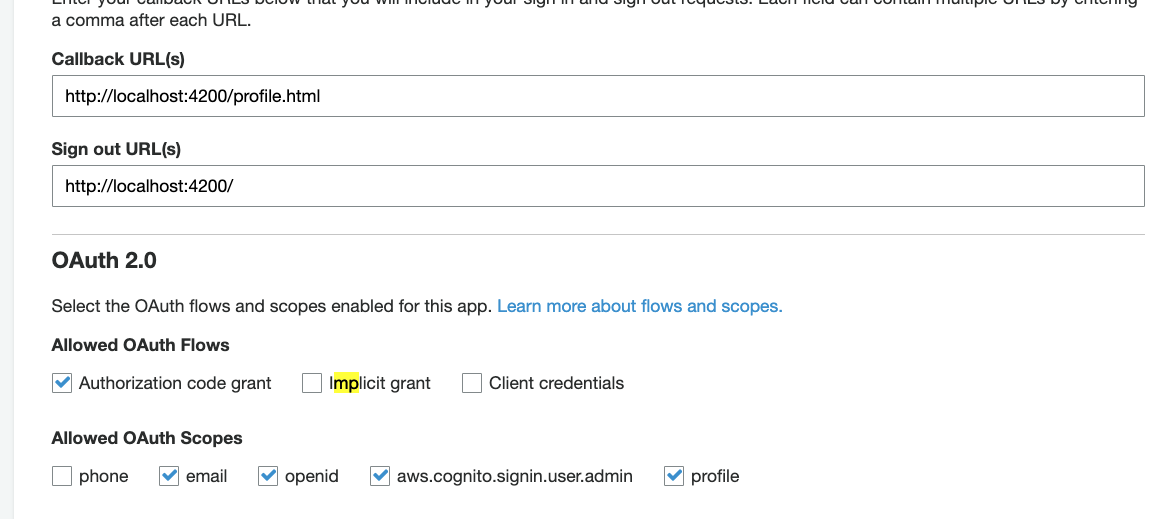
phonefrom authorized scopes, also check the settings for the App client like this