amplify-cli: UPDATE_FAILED error: api [unauthRoleName, authRoleName] do not exist in the template
Note: If your question is regarding the AWS Amplify Console service, please log it in the official AWS Amplify Console forum
** Which Category is your question related to? **
amplify-cli
** What AWS Services are you utilizing? **
dyamo, appsync, s3, cognito
** Provide additional details e.g. code snippets **
I upgraded amplify-cli3.0.0 to 3.11.0 after executing amplify api update.
However I ran into folowing error.
UPDATE_FAILED api AWS::CloudFormation::Stack Tue Oct 08 2019 15:23:16 GMT+0900 (Japan Standard Time) Parameters: [unauthRoleName, authRoleName] do not exist in the template
I failed to publish, what should I do solve this problem?
I exec following command on circleCI
amplify init --amplify "{\"envName\":\"staging\"}" --yes
amplify publish --invalidateCloudFront --yes
About this issue
- Original URL
- State: closed
- Created 5 years ago
- Reactions: 1
- Comments: 47 (8 by maintainers)
this error still persists 😦
Not working Please reopen this ticket.
Ok so I experienced this and can tell you what’s possibly happening. You or someone improperly merged your code or you/someone switched around environments or panic pulled an environment resulting in a lost file.
You probably committed later on, persisting that files removal or something of this nature.
The file(s) your projects have removed during a merge or amplify pull broke your cloudformation templates.
In most of the cases here I assume you are working with an API, most likely one resulting in a lambda function, and you removed your
parameters.jsonas this contains the role map.Pay attention to what you are merging, when you are switching environments, etc to what you are doing to the files in amplify directory and what the impact is going to be.
This isn’t the case that the framework is making a mistake or isn’t ready for prime time as much as it is is a continuation of the same pitfalls we are subject to anytime we are not paying as close enough attention as we should be. (sometimes a result of oversite, other times a lack of awareness of immediacy)
The tool is powerful but do not take it for granted by not paying as close enough attention to detail as needed or looking past the deeper awareness you’ll need of AWS/Amplify to be successful.
I am in the second large product built with it and blaming the tool is the first thing we jump to, but root cause often takes us in another direction.
Check it out - this is what broke ours - this was function for a REST API: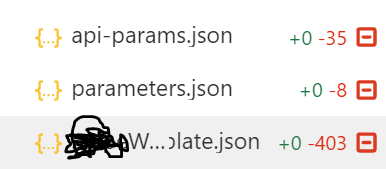
This error occurred for me today after
amplify add api. I have an imported Cognito user pool (amplify import auth) and maybe that new feature is causing the problem?My
paramters.jsonalready has the references mentioned in some workarounds (probably due to the recent #4814 fix):I even tried to paste the role names (instead of the ref) into
parameters.json, but I get the same error.The thing is, that my API is not even protected by Cognito (I chose “Restrict API access” => No). And
amplify update authdoesn’t work either, becauseupdateis not supported for imported user pools. I’m stuck now.Btw: After the attempted push the amplify cli hangs with the message
All resources are updated in the cloud. I have to abort the process. But then on the next push it tells me, that the API was already pushed successfully (amplify status => No Changes). So to try another fix I always have toamplify remove api,amplify pushand thenamplify add api. Makes trying to fix this issue tedious.And I sadly share the feeling of some people here that Amplify is not production-ready yet 😦. Even after two years of development it still breaks in basic places. Amplify has improved, but it still doesn’t feel reliable.
@mrducky4’s suggestion of rerunning
amplify auth upgradeand trying to adhere to the already configured options did the trick for me.I have to agree with @samputer — I’m not sure Amplify is production ready. I find myself continually having to trawl through the
@aws-amplify/cliissues in order to find a temporary solution to another bug in this library. There is so much promise but such little attention to detail across so many parts of Amplify which culminates in a less than enjoyable development experience.As usual, things break regurlaly with aws amplify, and after repairing something, this error reappears
An error occurs when executing
amplify pushwith the following conditions.amplify import authAMAZON_COGNITO_USER_POOLSandAWS_IAMis applied for additional authentication.I changed
@authto make some query public as follows, and I got the same error when executingamplify pushI’ve updated
paramters.jsonorCustomResources.json, but it hasn’t solved the problem. Please let me know if there is any other information you need.Another here with the same problem. I can push to a development environment locally, but as soon as I push to git and allow it to be built in the console using Amplify’s built-in CI/CD pipeline, I am seeing this error.
The fix mentioned earlier in this thread and in this issue https://github.com/aws-amplify/amplify-cli/issues/4814 seems to resolve it, but for how long!?
Completely agreed with @Bulletninja. I love the concept, but it feels like everything is one step forwards, two steps back with Amplify and I spend half of my time fighting with this rather than writing code. I’m really beginning to reconsider whether this is ready for prime-time.
Deleting the build folder inside: backend / api / api_name/ and running:
amplify api gql-compilebefore pushing solved the issue for me.I did not know that it was expected behaviour in 4.50.0+, still strange it failed and sadly I have no other way of repro. Currently we are at the end of our most important sprints so I was just happy the builds started working again but once things calm down towards the end of the week I can provide more info.
strange @PaulCailly , i added another function to one api yesterday, amplify-cli then removed those lines and all i had to do was add them back again. classic case of knowing the bugs in your system 😃
@cjihrig i think it won’t work, or at least not with the problem i encountered.
Error occured on aws-amplify cli 4.50.2 but adding the following back to the API’s cloudformation-template file (just before env) resolved it. Wasted a few good ours and could not deploy a new lambda for another day due to this. @paulcailly can you confirm it is working for you?
All these seems to be temporary fixes which may fix push once or twice, but it will eventually fail later on, especially when doing deployment with Amplify Console.
@UnleashedMind please advice what is either a permanent manually fix/workaround or if we can expect a new release that fixes this soon?
Same problem here, with 3.14.0. When I added storage and then try to push, the following error occurs and the push is aborted:
Parameters: [unauthRoleName, authRoleName, additionalQuestions] do not exist in the template