wordpress: SSO login failing when not using implicit flow
When you enable the Single Sign On (SSO) toggle in the Features settings of the plugin, some client javascript is rendered to checkSession and see if a valid SSO session is available at Auth0, to log the user in automatically without prompting for credentials.
The above flow is failing when there’s a valid SSO session at Auth0, causing the plugin code to display:
There was a problem with your log in
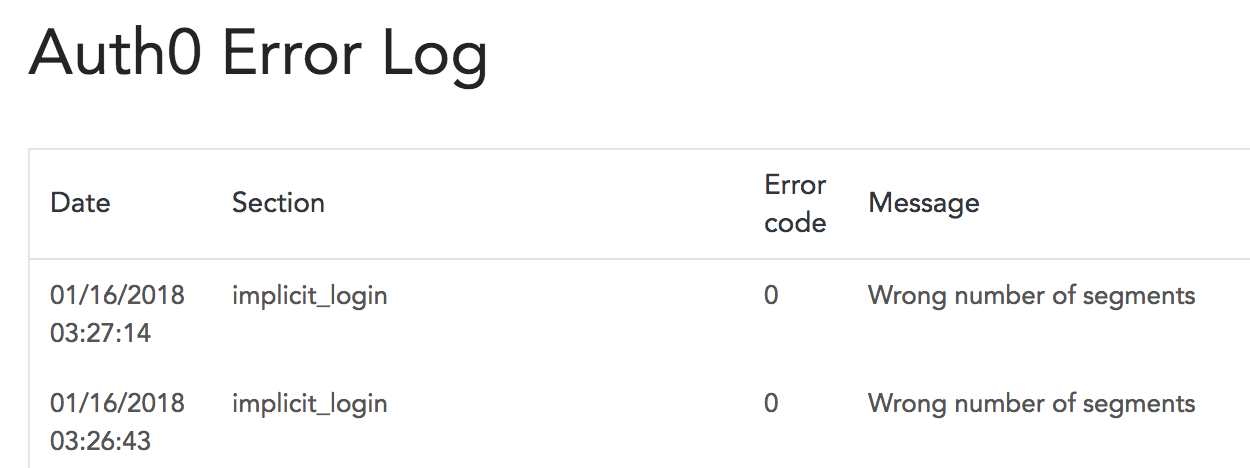
and logging a “Wrong number of segments” error in the internal plugin logs:
The checkSession callback does not have an idToken in the authResult, which causes the Wrong number of segments error described above.
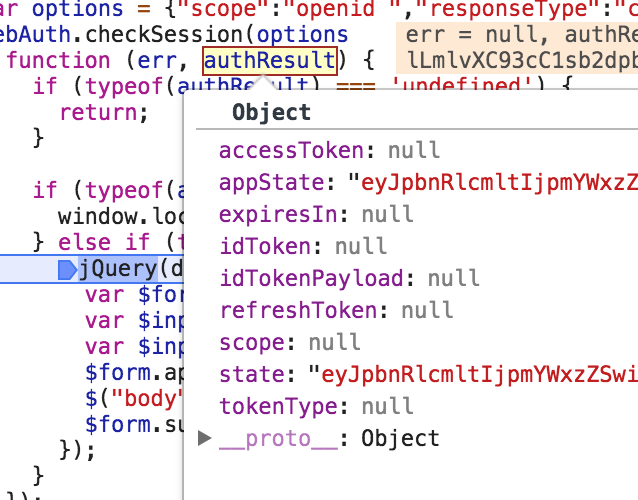
This is because the call to checkSession uses responseType: 'code' when implicit flow is turned off, and that response type is not supported by checkSession.
var options = <?php echo json_encode( $lock_options->get_sso_options() ); ?>;
results into:
var options = {"scope":"openid ","responseType":"code","redirectUri":"http:\/\/dev-nicotest1.pantheonsite.io\/index.php?auth0=1","state":"xxxx","nonce":"nonce"};
responseType: 'code' is not valid in checkSession:
To reproduce:
- Make sure the WP site is working with the Auth0 plugin
- Enable the Single Sign On (SSO) toggle in the plugin settings
- Disable the Implicit flow toggle.
- Log in with the Auth0 plugin into the WP site. This will create a session both in the WP site and in Auth0.
- Clear the cookies for the WP site (but leave the ones in Auth0). This will log you out of the WP site.
- Go to
/wp-login.phpinto the WP site. The rendered HTML will do acheckSessioncall (which will find a session in Auth0). You’ll get “There was a problem with your log in”
About this issue
- Original URL
- State: closed
- Created 6 years ago
- Reactions: 2
- Comments: 25 (18 by maintainers)
Commits related to this issue
- Experiment for #363 — committed to auth0/wordpress by joshcanhelp 6 years ago
- Experiment for #363 — committed to auth0/wordpress by joshcanhelp 6 years ago
- Experiment for #363 — committed to auth0/wordpress by joshcanhelp 6 years ago
- fixing Lock options sending an incorrect responseType, preventing SSO login; fixing incorrect redirect URL used for SSO; removing related but unused template; fixes #363 — committed to auth0/wordpress by joshcanhelp 6 years ago
- fixing Lock options sending an incorrect responseType, preventing SSO login; fixing incorrect redirect URL used for SSO; removing related but unused template; fixes #363 — committed to auth0/wordpress by joshcanhelp 6 years ago
- fixing Lock options sending an incorrect responseType, preventing SSO login; fixing incorrect redirect URL used for SSO; removing related but unused template; fixes #363 — committed to auth0/wordpress by joshcanhelp 6 years ago
- fixing Lock options sending an incorrect responseType, preventing SSO login; fixing incorrect redirect URL used for SSO; removing related but unused template; fixes #363 — committed to auth0/wordpress by joshcanhelp 6 years ago
Could we get an update on when this will be fixed?