api-platform: Cannot start docker services
Hello.
I’m struggling with docker in AP 2.2.0.
When I run docker-compose up -d, everythings seems to work.
docker-compose up -d --build

...

Successfully built d04505723c6d
Creating apiplatform220_admin_1       ... done
Creating apiplatform220_php_1         ... done
Creating apiplatform220_client_1      ... done
Creating apiplatform220_api_1         ... done
Creating apiplatform220_admin_1       ...
Creating apiplatform220_cache-proxy_1 ... done
Creating apiplatform220_cache-proxy_1 ...
Creating apiplatform220_h2-proxy_1    ... done
But when I try to open https://localhost I’m having an exception ERR_CONNECTION_REFUSED.
My logs :
docker-compose logs -f
Attaching to apiplatform220_h2-proxy_1, apiplatform220_cache-proxy_1, apiplatform220_api_1, apiplatform220_admin_1, apiplatform220_client_1, apiplatform220_php_1, apiplatform220_db_1
h2-proxy_1     | 2018/02/16 21:26:45 [emerg] 1#1: host not found in upstream "client" in /etc/nginx/conf.d/default.conf:9
api_1          | 2018/02/16 21:26:19 [emerg] 1#1: host not found in upstream "php" in /etc/nginx/conf.d/default.conf:11
h2-proxy_1     | nginx: [emerg] host not found in upstream "client" in /etc/nginx/conf.d/default.conf:9
api_1          | nginx: [emerg] host not found in upstream "php" in /etc/nginx/conf.d/default.conf:11
cache-proxy_1  | + varnishd -a :80 -f /etc/varnish/default.vcl -s malloc,256m
php_1          | Composer could not find a composer.json file in /srv/api
admin_1        | yarn run v1.3.2
client_1       | yarn run v1.3.2
cache-proxy_1  | Error: Cannot read -f file '/etc/varnish/default.vcl' (No such file or directory)
php_1          | To initialize a project, please create a composer.json file as described in the https://getcomposer.org/ "Getting Started" section
admin_1        | info Visit https://yarnpkg.com/en/docs/cli/run for documentation about this command.
db_1           | LOG:  database system was shut down at 2018-02-16 21:07:03 UTC
client_1       | error Couldn't find a package.json file in "/usr/src/client"
cache-proxy_1  | (-? gives usage)
admin_1        | error Couldn't find a package.json file in "/usr/src/admin"
db_1           | LOG:  MultiXact member wraparound protections are now enabled
client_1       | info Visit https://yarnpkg.com/en/docs/cli/run for documentation about this command.
db_1           | LOG:  database system is ready to accept connections
db_1           | LOG:  autovacuum launcher started
db_1           | LOG:  database system was interrupted; last known up at 2018-02-16 21:08:05 UTC
db_1           | LOG:  database system was not properly shut down; automatic recovery in progress
db_1           | LOG:  invalid record length at 0/14EE8E0: wanted 24, got 0
db_1           | LOG:  redo is not required
db_1           | LOG:  MultiXact member wraparound protections are now enabled
db_1           | LOG:  database system is ready to accept connections
db_1           | LOG:  autovacuum launcher started
apiplatform220_h2-proxy_1 exited with code 1
apiplatform220_api_1 exited with code 1
apiplatform220_client_1 exited with code 1
apiplatform220_php_1 exited with code 1
apiplatform220_cache-proxy_1 exited with code 255
apiplatform220_admin_1 exited with code 1
Anyone can help me ?
Additional notes
OS : Windows
docker -v
Docker version 17.12.0-ce, build c97c6d6
docker-compose ps
            Name                          Command               State             Ports
------------------------------------------------------------------------------------------------
apiplatform220_admin_1         /bin/sh -c yarn start           Exit 1
apiplatform220_api_1           nginx -g daemon off;            Up         0.0.0.0:8080->80/tcp
apiplatform220_cache-proxy_1   docker-app-start                Exit 255
apiplatform220_client_1        /bin/sh -c yarn start           Exit 1
apiplatform220_db_1            docker-entrypoint.sh postgres   Up         0.0.0.0:5433->5432/tcp
apiplatform220_h2-proxy_1      nginx -g daemon off;            Exit 1
apiplatform220_php_1           docker-entrypoint php-fpm       Exit 1
About this issue
- Original URL
- State: closed
- Created 6 years ago
- Comments: 37 (16 by maintainers)
I manage to solve my issue by doing this :
If select a drive and apply doesn’t work (that was the case for me ), do a Reset to factory default… in Reset docker tab.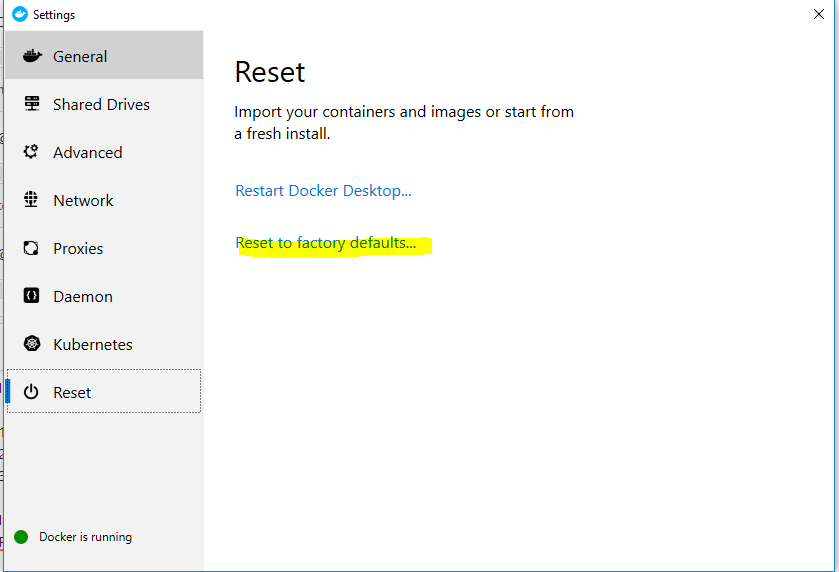
I’m using Docker for Windows and I’ve uninstalled/installed the latest version. I don’t understand what happend but I’ve finally succeeded to make it work with this : https://stackoverflow.com/questions/42203488/settings-to-windows-firewall-to-allow-docker-for-windows-to-share-drive/43904051#43904051
But I’m not sure about that. I’ve rebooted my PC and it doesn’t work anymore
I have some news about this issue. It looks like my anti-virus, Kaspersky, was blocking docker connection. If I disable the protection, I’m able to up all services and access services endpoints.
As long as my anti-virus is suspended, I can navigate through differents UI.
I ended up by edit my firewall rules to set docker connection as safe connection
I think this is more related to a missconfiguration of my PC (firewall/Kaspersky/wamp even if turned off, maybe) rather than AP
The mysteries of life. 💁♀️💁♀️💁♀️ 😆
OK, really weird. I installed AP 2.2.5 on another computer running on Windows 10 too and all worked fine, without
COMPOSE_CONVERT_WINDOWS_PATHS=1