superset: Error while changing data source in chart
I am getting an error while changing data source in chart after selecting new data source
Expected results
Data source should get changed to chosen source.
Actual results
Message “An error occurred”
Screenshots


Environment
- superset version: 0.30.0
- python version: 3.6.9 `
Checklist
Make sure these boxes are checked before submitting your issue - thank you!
- I have checked the superset logs for python stacktraces and included it here as text if there are any.
- I have reproduced the issue with at least the latest released version of superset.
- I have checked the issue tracker for the same issue and I haven’t found one similar.
About this issue
- Original URL
- State: closed
- Created 5 years ago
- Comments: 31 (11 by maintainers)
I resolved issue by adding this to superset config
ENABLE_PROXY_FIX = Trueand configuring nginx like this
These lines do the trick proxy_set_header X-Forwarded-SSL on; proxy_set_header X-Forwarded-Proto https;
I’m also experiencing this on
0.36.0. My issue appears related to this one https://github.com/apache/incubator-superset/issues/8686 in that I’m getting a JavaScript console error:However I have applied every workaround, including setting
ENABLE_PROXY_FIXandPROXY_FIX_CONFIGinsuperset_config.pyas well as validating theX-Forwarded-Protoand other headers are set and it doesn’t seem to resolve the issue.I am running superset on HTTPS behind an nginx reverse proxy.
This issue is solved on Firefox and Safari with the lastest comment.
But not on chrome :
Without proxy: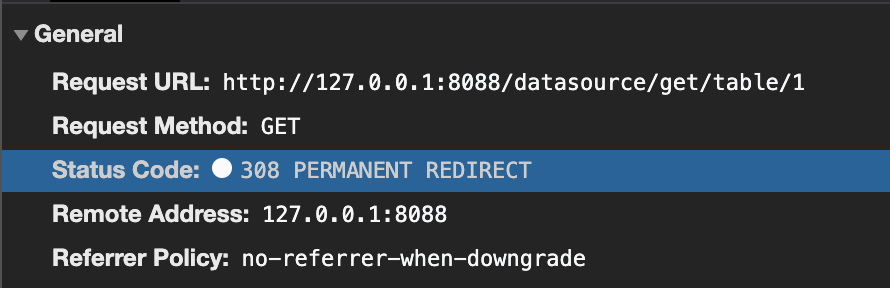
With: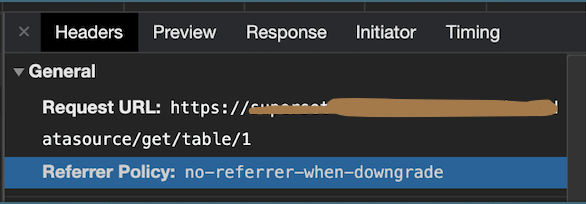
Did you find any solution to it? I am still facing the issue in superset 0.36.0
Update: Finally I was able to upgrade it to 0.35.1 and ran “db upgrade” and “init” command. ‘Logging_configurator’ error was due to pip3, only pip should be use to install. But I am still facing the issue of changing data source in chart and this issue is coming only on production server not in staging. Only difference between two setup is that on production we are using “nginx” reverse proxy and “gunicorn” for superset and using “postgres” to store superset metadata instead of default sqllite. Is it due to postgres database?