infrastructure: [Incident] Dask Gateway fails with Unavailability of Compute Engine Resources - turned out to be a transient issue
Summary
Background
The Pangeo community recently tried to update their user environment image via the Configurator. When user sessions started with the new image, Dask Gateway was no longer functional.
When the image was bumped to 2022.02.04 then running the following code:
from dask_gateway import GatewayCluster
cluster = GatewayCluster()
cluster.scale(20)
Would not function properly. Looking at some of the logs in the GCP console, we saw these errors:
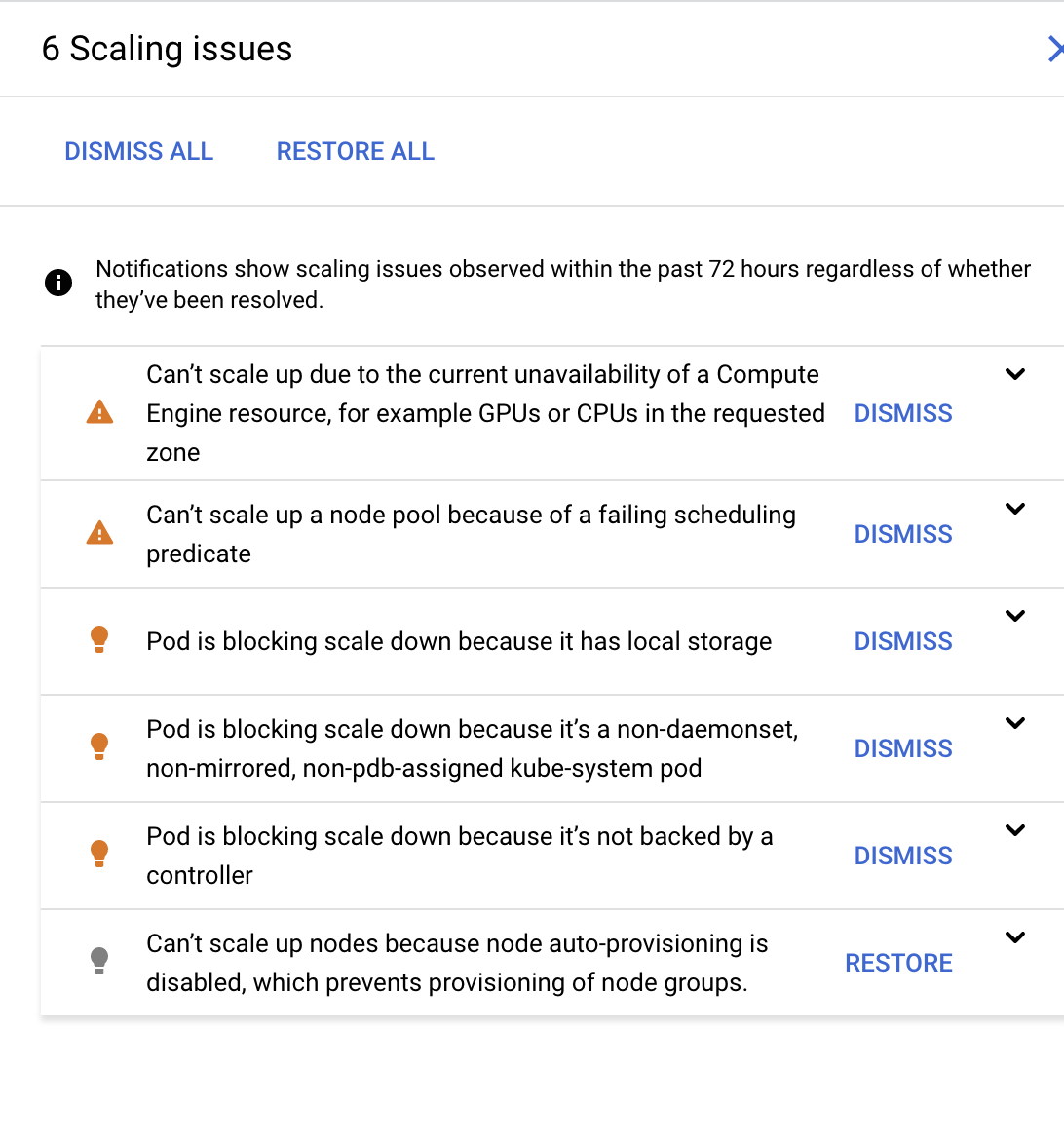
Resolution
Ultimately, we realized that this was likely a transient issue due to Google Cloud’s resource limits being reached, and the fact that we are not paying for dedicated guaranteed resources.
Relevant information
- Hub URL: http://us-central1-b.gcp.pangeo.io/
- FreshDesk ref: https://2i2c.freshdesk.com/a/tickets/82
- Pangeo image repo is here: https://github.com/pangeo-data/pangeo-docker-images
- A diff of the repo changes between these two versions: https://github.com/pangeo-data/pangeo-docker-images/compare/2021.10.19...2022.02.04
Actions to resolve
We’ll need to collaborate with folks in the Pangeo community who are familiar with the user environment images (maybe that is @scottyhq and @rabernat ? Please cc others who may have insight). We could then do some combination of:
- Look at the diff in the user image, and try to spot anything that would obviously stop Dask Gateway from scaling: https://github.com/pangeo-data/pangeo-docker-images/compare/2021.10.19...2022.02.04
- If that doesn’t work, then work backwards with earlier releases of the image, running the code snippet above to see if it works. When we find an image environment that works, then we can figure out the exact diff that broke it.
- Work with members of the Pangeo team to identify the problem and resolve it
- Incident has been dealt with or is over
- Sections below are filled out
- Incident title and after-action report is cleaned up
- All actionable items above have linked GitHub Issues
Timeline
All times in US/Pacific.
2022-02-17 - First reports
- @rabernat reported that the Dask Gateway cluster was not scaling properly
- After some investigation, we realized that this happened just after bumping the user image to
2022.02.04. - Reverting the image made things work again, but now we cannot update the user image without breaking things.
2022-02-18 - 2022-02-22 - Investigation
2i2c team investigated what could be going on, and suspect that the issue was a change in the environment image dependencies (see links to relevant diffs etc above). We identified several process / technical improvements that could have prevented this (see below), but still unsure of the specific incompatibility in the image.
2022-02-22 - 2022-03-08
Tried various investigations into things that are going wrong, including:
- Trying the same operation on the AWS Hub (surprised that it worked): https://github.com/2i2c-org/infrastructure/issues/1031#issuecomment-1050474979
- Investigating the series of commits to the Pangeo user image: https://github.com/2i2c-org/infrastructure/issues/1031#issuecomment-1051441864
During this time, the Pangeo hub was functional because it was using the previous user image.
2022-03-09
- We noted that Dask Gateway hadn’t had a release, so it is unlikely that the problem was due to a Dask Gateway incompatibility
- Investigating the error message "
- Concluded that this was a transient issue due to GCP’s resources being maxxed out: https://github.com/2i2c-org/infrastructure/issues/1031#issuecomment-1064619883
After-action report
What went wrong
- Google’s resources on the cluster were maxed out. Because we do not pay GCP for guaranteed cloud resources, occasionally they will not be available. When the Dask Gateway cluster was created, this resulted in the error shown above.
- This happened to coincide with a bump in the user image for this hub, and so we originally thought the error was due to that issue.
- After a lot of investigation, we couldn’t figure out why the user environment was the cause of the problem.
- Finally we discovered that this was due to the resource constraints issue above, and that this was transient.
Where we got lucky
- We were lucky that it was possible to quickly revert the image, when the previous one wasn’t working.
- We were unlucky that the transient issue happened to coincide with a user action, which led us down the wrong debugging path.
Future action items
Process improvements
- Define a policy about what kind of guidance 2i2c can provide to communities who manage their own environments. Tracked in: https://github.com/2i2c-org/infrastructure/issues/1016
Technical improvements
- We need a way to validate the environment that is present in user images, to ensure some basic validity checks as a part of CI/CD: https://github.com/2i2c-org/infrastructure/issues/1016
- We should automatically test Dask Gateway as part of new hub deploys - doing this could have helped us catch this issue earlier on. Tracked in https://github.com/2i2c-org/infrastructure/issues/152
About this issue
- Original URL
- State: closed
- Created 5 years ago
- Reactions: 2
- Comments: 19 (19 by maintainers)
@rabernat if you see https://github.com/2i2c-org/infrastructure/issues/1031#issuecomment-1063684279, the image change actually had nothing to do with the problem here at all. It was just a coincidence.
Hey all - I believe that this one is now resolved, and I’ve updated the top comment with a timeline and overview of the problem. Annoyingly I could not think of too many follow-ups to improve upon, because the root problem here was transient, and we mostly just needed to “try it again”. We do have a few issues to track enforcing specifications in the user environment which should help at least narrow down the potential problems in the future.
I’m going to close this one, but if anyone has suggestions for other process / tech improvements we need, please suggest them and/or open issues!
https://us-central1-b.gcp.pangeo.io/services/configurator
Docs: https://docs.2i2c.org/en/latest/admin/howto/configurator.html
People with admin access can change the image: https://github.com/2i2c-org/infrastructure/blob/6e66c84176c8d7f91b1a8ad4b9d71b5f2256d076/config/clusters/pangeo-hubs/staging.values.yaml#L47-L51
Googling the first error message in the screenshot posted takes me to https://cloud.google.com/compute/docs/troubleshooting/troubleshooting-vm-creation, which has a lot of useful information. In particular, it states Because this situation is temporary and can change frequently based on fluctuating demand, try your request again later.. I think this is because dask workers are preemptible instances (similar to spot AWS instances), and hence during the time this scale up was attempted, Google Cloud was just ‘full’.
I just tried the latest image on the staging cluster, and could spin up 20 dask workers and do some computation with the newest image (2022.02.04)
So I think the image change was pure coincidence, and what really happened was that the cloud was full and put you on hold.
Maybe the thing to do is to intentionally break the user image on the Pangeo staging hub, so that we can look at the logs once somebody tries a scaling event w/ Dask Gateway. I think that the configurator works the same way on https://staging.us-central1-b.gcp.pangeo.io/ as it does on
prod, so it shouldn’t bottleneck on having merge rights toinfrastructure/.If we can break staging by upgrading the image, then prod will stay functional and it should be easier to debug
@scottyhq I was trying to figure out which PR upgraded the version of the relevant packages you posted there, and it seems like many of them have numerous pinnings throughout the repository, and don’t necessarily all change at once. What is the easiest way to answer the question “when did package X get updated in the Pangeo image, and which release is associated with it?”